Imagine Art AI Video Generator

ImagineArt AI Video Generator Core Functionalities: How You Make Videos
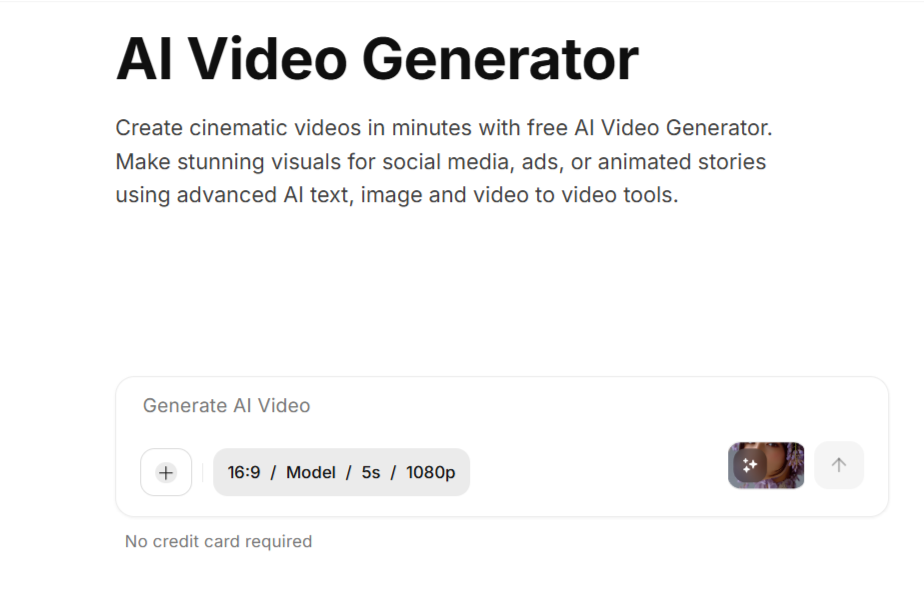
ImagineArt video generator supports three main input modes, allowing you to start your project based on the assets you already have:
Text to Video: The AI video generator transforms the words in your prompt into realistic scenes, characters, and camera movements that perfectly match your script. This is ideal for scenarios like video tutorials, marketing ads, YouTube content, and AI storytelling.
Image to Video: This mode integrates cues for light, depth, and motion to animate static visuals, such as product shots, digital art, or photos, with cinematic precision. It can generate realistic AI motion videos ranging in quality from 720p up to 1440p while ensuring smooth transitions and natural movement.
Video to Video: If you have existing footage, this feature allows you to upgrade it using AI video enhancement tools. With a single click, the tool can restyle, enhance resolution, and improve the texture of your footage. You can adjust color grading, lighting, and motion dynamics to achieve cinematic visuals without the need for reshooting.
Key ImagineArt AI Video Generator Features and Capabilities
ImagineArt comes packed with many specialized features that streamline the creative process and ensure professional results:
AI Prompt Enhancer: If your initial text prompt is lacking, the AI can automatically rewrite and optimize it to ensure better composition, deeper motion, and improved storytelling flow, thus eliminating "weak outputs".
Character Consistency: A major challenge in AI video generation is maintaining the appearance of a character across multiple shots. ImagineArt addresses this by locking in the style, appearance, and motion of your main character for seamless narratives.
AI Audio Sync: This feature ensures that every beat, sound, and dialogue line aligns perfectly with the visuals, resulting in a smooth, professional rhythm and eliminating awkward timing.
AI Emotional Direction: You can communicate the desired mood to the AI (e.g., chaotic, romantic, tense, hopeful), and the system will deliver scenes where the lighting, gestures, and overall atmosphere mirror that emotion.
Endless Style Options and Motion Transfer: You can switch aesthetics instantly, choosing between styles such as animated, photorealistic, surreal, or cinematic, with every option appearing "handcrafted by a pro".
Realistic In Speech Video: This allows the generation of lifelike speaking videos where the tone, lip sync, and expressions perfectly match the narration or dialogue.
AI Video Extender: This tool can expand short clips into complete sequences by adding context, motion, and transitions that appear intentionally shot rather than merely looped.
Video Quality Enhancer: This can fix shaky, dull, or grainy clips, enhancing the texture, color, and clarity so that every frame looks cinematic, again saving the need for a full reshoot.
Bulk Video Generation: For comparison or large campaigns, you can create multiple variations of a single concept simultaneously, allowing you to compare visual style, tone, and pacing to find the most impactful version.
Organized Asset Library: ImagineArt Video Generator provides instant access to every generated asset (prop, character, or scene), making it faster to build new videos using reusable, AI-sorted components.
AI Avatar Video Generator: ImagineArt suite also includes an AI Avatar Video Generator that creates lip-synced avatar videos from text or documents, perfect for tutorials or explainers.

Use Cases: Who Benefits from ImagineArt AI Video Generator?
Many creators, marketers, designers, and professionals from leading brands use ImagineArt. The platform is suitable for different applications:
Marketing and Advertising: You can generate brand spots, full commercials, and polished marketing clips that feel cinematic and are designed to sell. The AI video maker allows for turning product ideas into reality without needing a studio setup.
Social Media Content: It is effective for creating short videos that are designed to stop the scroll, including funny skits, cinematic nature shots, and content specifically tailored for platforms like Instagram Reels, TikTok, and YouTube.
UGC Creation: Content creators can generate user-generated content (UGC), such as reviews, reaction videos, and avatars that talk and emote naturally, which helps brands create relatable, authentic content without requiring real shoots.
Storytelling and Filmmaking: Storytellers and filmmakers can transform prompts and scripts into cinematic trailers, visual experiments, or story clips, leveraging dramatic lighting, depth, and clean motion to give their ideas a film-like feel.
Tutorials and Explainers: The platform is ideal for creating professional-quality demo videos, explainers, or tutorials, often utilizing AI avatars with realistic voices and facial expressions.
Video Enhancement: Users can save time and resources by using the platform to clean up old, dull, or grainy footage, effectively saving entire product shoots.
ImagineArt AI Video Generator Integrations
ImagineArt distinguishes itself by integrating and offering access to several leading AI models, making it a powerful "All-In-One AI Video Generator". While there is no single "best" option in the market, ImagineArt provides exceptional results by integrating these tools.
The models you can access on the platform include:
Google VEO: Includes VEO, VEO 2, 3, 3 Fast, 3.1, and 3.1 Fast, known for fast, lifelike videos.
Sora AI: Specifically Sora 2, used for advanced AI storytelling with cinematic realism.
Runway AI: Includes Runway Aleph and Runway Act II, which offer professional production and editing tools.
Pixverse AI: Includes V3.5, V4, V4.5, and V5, offering cinematic AI videos with realism and vivid detail. (Note: PixVerse V5 is specifically recommended within ImagineArt for animation, creating fluid motion and expressive visuals).
Kling AI: Includes Kling 1.5, 1.6, 2.1, and 2.5 turbo standard, used for smooth, dynamic AI animations.
Hailuo AI: Includes Hailuo 2.0, 2.3, and 2.3 Fast, noted for fluid cinematic videos with natural motion effects.
WAN AI: Includes WAN 2.2, 2.2 Animate, and 2.5, which produce hyperrealistic videos with precise motion.
Seedance AI: Includes Seedance 1.0 and Seedance Pro Fast. (Note: Seedance Lite is recommended for beginners, as it delivers high-quality visuals automatically with no technical setup required).
ImagineArt AI Video Generator Pricing and Subscriptions
ImagineArt operates on a credit system, with different models consuming credits at varying rates. Subscriptions are generally billed quarterly, and upgrading grants access to more and better features.
You can start using the AI Video Generator without a credit card through the Free plan.
Let’s look at the plan breakdown:
1. Free
Credits: 6000 credits per month (180,000 credits per year).
Access: Limited to in-house models only.
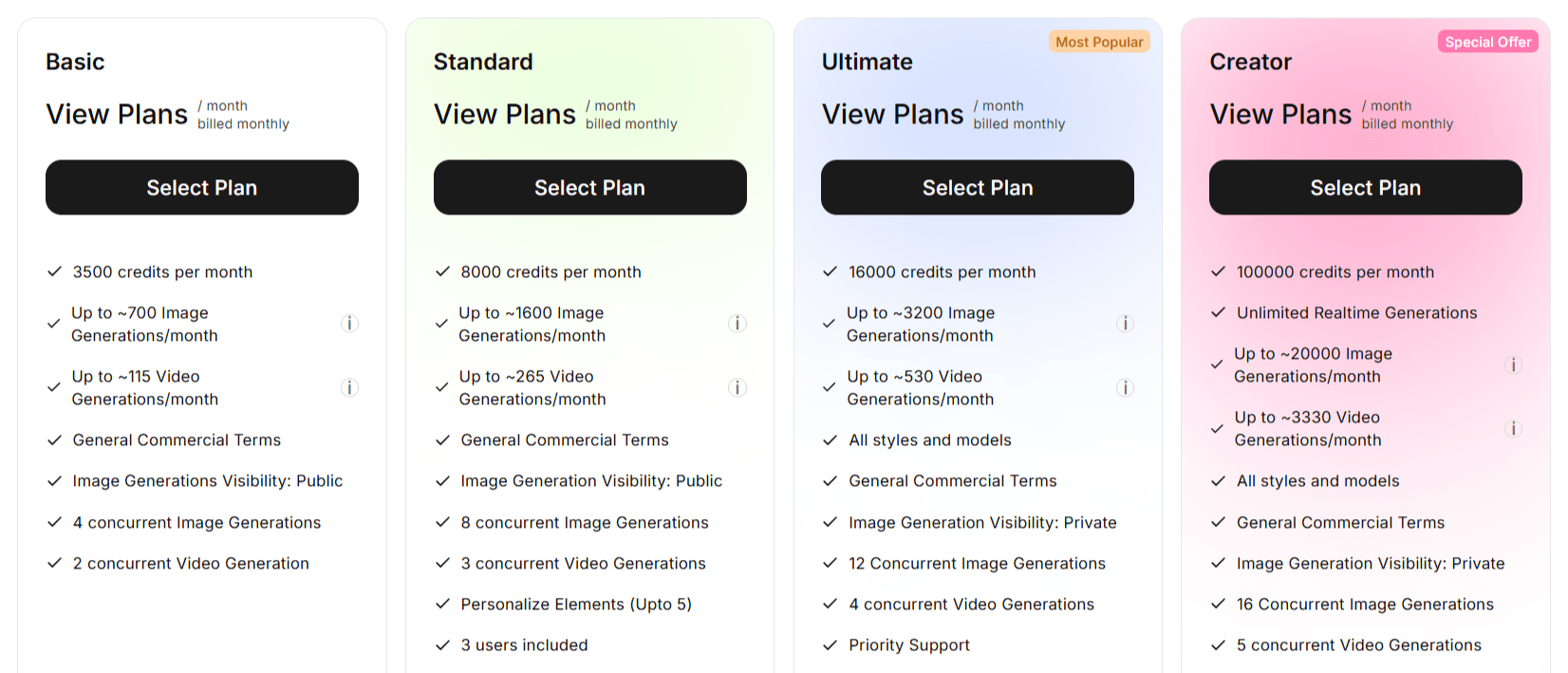
2. Basic
Credits: 3500 credits per month.
Generation Estimates: Up to approximately 700 images or 115 video generations per month.
Concurrency: 4 concurrent images and 2 concurrent video generations.
Image Visibility: Public.
3. Standard
Credits: 8000 credits per month.
Generation Estimates: Up to approximately 1600 images or 265 video generations per month.
Users: 3 users included.
Features: Personalize elements (up to 5).
Concurrency: 8 concurrent images and 3 concurrent video generations.
Image Visibility: Public.
4. Ultimate
Credits: 16000 credits per month.
Generation Estimates: Up to approximately 3200 images or 530 video generations per month.
Access: Includes all styles and models.
Users: 6 users included.
Features: Personalize elements (up to 30), Priority Support, and higher priority in the generation queue.
Concurrency: 12 concurrent images and 4 concurrent video generations.
Image Visibility: Private.
5. Creator (The Most Extensive Option)
Credits: 100000 credits per month.
Generation Estimates: Up to approximately 20000 image or 3330 video generations per month.
Access: Unlimited real-time generations and all styles and models.
Users: 40 users included.
Features: Includes unlimited personalization, Priority Support, higher generation priority, and unlimited access to specific models like Hailuo 2.3, Seedance Pro Fast, and Kling 2.5 Pro.
Concurrency: 16 concurrent images and 5 concurrent video generations.
Image Visibility: Private.
Pros
ImagineArt AI Video Generator is positioned as a simple, fast, and accessible tool for creating professional, cinematic video content.
1. High Quality and Professional Output
Cinematic Realism: The platform creates high-quality, cinematic videos. Videos are generated to look fully natural and realistic.
No Watermarks: Generated videos do not contain watermarks or AI indicators, ensuring the final product appears entirely original.
Quality Enhancement: The Video Quality Enhancer can fix shaky, grainy, or dull clips, enhancing color, texture, and clarity to make every frame look cinematic, potentially saving the user from having to reshoot existing footage.
2. Comprehensive Integration
Access to Top Models: ImagineArt functions as an "All In One AI Video Generator" by integrating and providing access to leading models, including Sora AI, Google VEO, Runway AI, Pixverse AI, Kling AI, Hailuo AI, WAN AI, and Seedance AI. The use of Google VEO, SORA, and Runway technologies is highlighted for delivering exceptional results.
Model Specialization: It offers specific model recommendations, such as PixVerse V5 for animation (fluid motion and expressive visuals) and Seedance Lite for beginners (high-quality visuals with no technical setup).
3. Multi-Option Creation Capabilities
Multi-Mode Input: Users can start the creation process using Text to Video, Image to Video, or existing Video to Video clips, allowing the AI to transform any idea into a polished video.
4. Accessibility and Business Focus
Free Starting Point: ImagineArt allows users to start creating AI videos using a Free plan, which provides 6,000 credits per month (180k credits per year) without requiring a credit card.
Marketing Utility: It is effective for creating ads that sell and turning product ideas into polished videos without needing a studio setup.
UGC and Social Media: It helps brands and creators generate authentic UGC (user-generated content) and short videos that are designed to "stop the scroll" on platforms like YouTube, TikTok, and Instagram Reels.
Browser-Based: The tool works directly in your browser, though a mobile app is also available for quick access.
Cons (Inferred Limitations)
ImagineArt AI Video Generator is a powerful tool for creating videos. However, like other AI video generators, it has some disadvantages. Let’s look at them.
1. Limited Model Access on Free Plan
Restricted Technology: The Free plan is explicitly limited to using "In-house models only". Access to the advanced and top-tier models (like Sora AI, Google VEO, Runway AI, etc.) is reserved for paid subscriptions (Standard, Ultimate, or Creator plans).
2. Feature and Volume Gating
Credit Dependence: Usage, including the estimated number of image and video generations, is strictly tied to monthly credit limits, meaning high-volume users must purchase higher-tier plans.
Concurrency Limits: The number of simultaneous generations (concurrent image and video generations) is restricted and increases only with more expensive plans.
Feature Exclusivity: The most comprehensive access, including "Unlimited Realtime Generations" and unlimited access to specific premium models (like Hailuo 2.3 and Kling 2.5 Pro), is only granted in the highest-tier Creator plan.
3. Privacy Limitations
Public Visibility: For users on the Basic and Standard plans, the Image Generation Visibility is listed as Public. You must subscribe to the Ultimate or Creator plans to guarantee Private Image Generation Visibility.
Conclusion
The ImagineArt AI Video Generator stands out as a powerful, all-in-one platform that makes professional video creation fast, simple, and accessible for everyone from creators to leading brands.
Its core strength lies in its different input capabilities, allowing users to transform text prompts, static images, or existing video footage into polished, cinematic visuals. This is supported by its nature as an "All In One AI Video Generator," which integrates and offers access to top-tier models like Google VEO, Sora AI, and Runway AI, providing users with exceptional results across various generation tasks.
Imagine Art AI Video Generator Alternatives
View All