What Is AI Video? An 8-Point Explainer for 2026
The practical way to understand AI video is to break it into its main parts: what the technology does, which tool categories matter, where it fits in a real workflow, which jobs it handles well, and where legal or brand risk enters the process. That's what helps creators, marketers, educators, and in-house teams make better decisions instead of chasing novelty.
May 26, 2026 13:34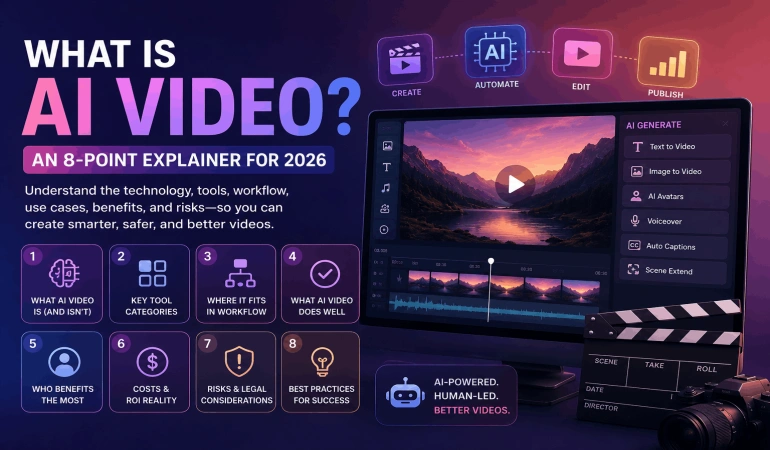
1. What Is AI Video?
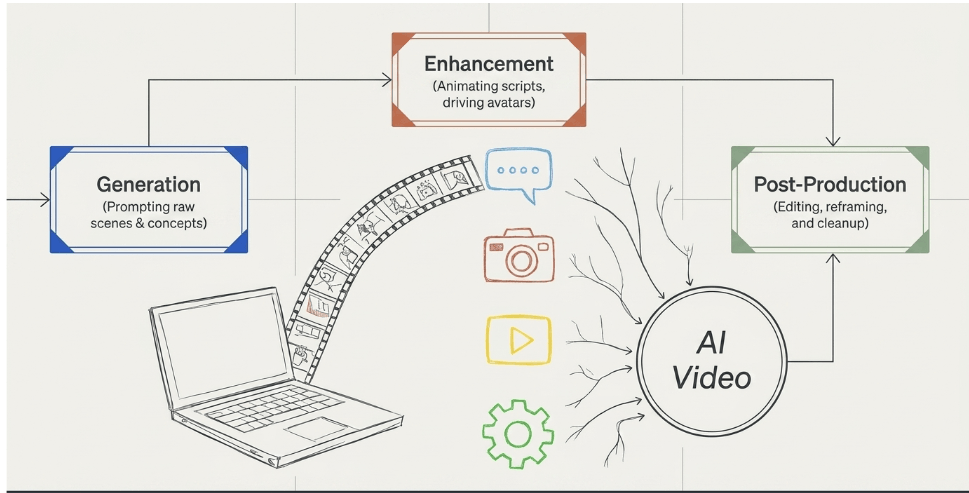
AI video is video created, edited, or enhanced with machine learning systems. Sometimes the system generates footage from text. Sometimes it animates an avatar from a script. Sometimes it works like post-production assistance by removing backgrounds, cleaning audio, creating captions, or reframing clips for different platforms.
The easiest way to think about it is this: AI video is not one tool. It's a production layer. It can sit at the start of the process, in the middle, or at the end.
What counts as an AI video
A Runway prompt that generates a short product-style scene counts. A Synthesia presenter reading a training script counts. A Descript workflow that transcribes, removes filler words, and lets you edit a video by editing text also counts.
That broad scope is why beginners often get confused. They expect one category, but the actual field encompasses generation, avatars, translation, enhancement, editing, repurposing, and automation.
AI video works best when you assign it a job, not when you ask it to replace a whole production team.
In practice, it's strongest in repeatable formats:
Ad variations: E-commerce teams can turn one offer into multiple visual versions for different audiences.
Training content: Internal teams can update scripts without booking another shoot.
Faceless channels: Creators can pair generated visuals, stock, voice, and captions into a publishable workflow.
Localization: Marketing teams can adapt one message across languages and regions.
Faceless channels: Creators can pair generated visuals, stock, voice, and captions into a publishable workflow (learn more in our full guide on how to create a faceless video).
What it is not
It isn't a universal substitute for live-action production. If you need a founder on camera, a documentary interview, a product shoot with exact hand interaction, or a branded commercial with strict art direction, AI may support the process but won't fully replace it.
That's the practical definition. AI video is a set of tools that automates parts of video production at scale. The better question isn't “Is it real video?” It's “which part of my workflow should AI handle?”
2. Text-to-Video Generators
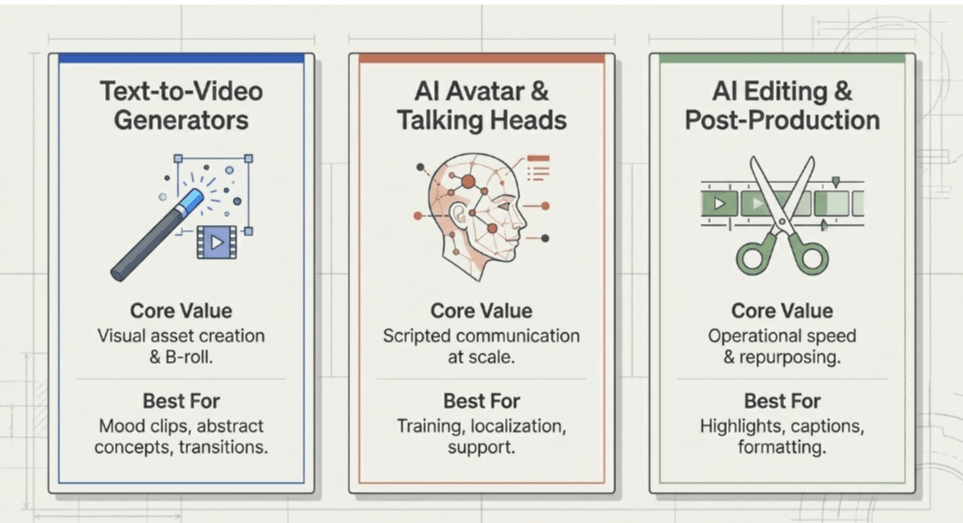
Text-to-video is the part of AI video that gets the most attention, and it is also the easiest category to misunderstand. A prompt can produce a usable shot in minutes, but that does not mean it can carry an entire production on its own.
Its core value is narrower and more practical. It gives teams a fast way to create visual assets that would otherwise require stock research, motion design, location shooting, or a VFX budget.
The workflow is simple on paper. Write a prompt. Generate several clips. Keep the one with the right motion, framing, and tone. In practice, the work happens in revision. Good operators treat these tools like a shot generator, not a finished-video button.
What these tools actually do well
Runway is strong for stylized motion, concept scenes, and short ad inserts. Pika is often used for animated or visually exaggerated clips that need speed more than precision. Google Veo 3, where available, is known for stronger scene realism and better motion coherence in some outputs. Adobe Firefly fits teams that already build inside Adobe and want to get closer to the rest of the editing process.
For cinematic creative work, camera direction matters as much as the scene itself. Higgsfield’s advanced tools like AI Cinematic Video Generator give creators more control over cinematic camera shots for atmospheric scenes, product visuals, and campaign concepts.
These tools perform best when the goal is visual communication, not exact replication. They are good at atmosphere, motion, transitions, and invented scenes. They are less reliable when a brand needs the product, setting, hand movement, logo placement, or sequence of actions to be exact.
A few common production uses:
Product mood clips: A skincare brand can create soft background footage to support an existing pack shot or testimonial.
Explainer cutaways: A software team can generate abstract visuals for concepts like automation, dashboards, or data movement.
Music and social visuals: Creators can build loops, intros, and transition clips without commissioning custom animation.
Prompting is only part of the job
Short, specific prompts usually produce better starting points than overloaded ones. The useful variables are straightforward. Define the subject, the framing, the lighting, the movement, and the style. Then test variations.
Useful prompt ingredients include:
Subject detail: What should appear on screen.
Camera intent: Close-up, wide shot, overhead, tracking, handheld.
Visual style: Photoreal, animated, ad-style, documentary-style, illustration.
Motion instruction: Slow pan, product rotation, walking, drifting smoke, crowd movement.
One rule matters more than the rest. Generate short clips first.
Longer generations increase continuity problems, object drift, and weird physical behavior.
A glass changes shape between frames. A hand grips the wrong side of a bottle. Background elements appear, disappear, or slide. Those errors are manageable in a 3 to 5-second insert. They become expensive when you try to build a full sequence around them.
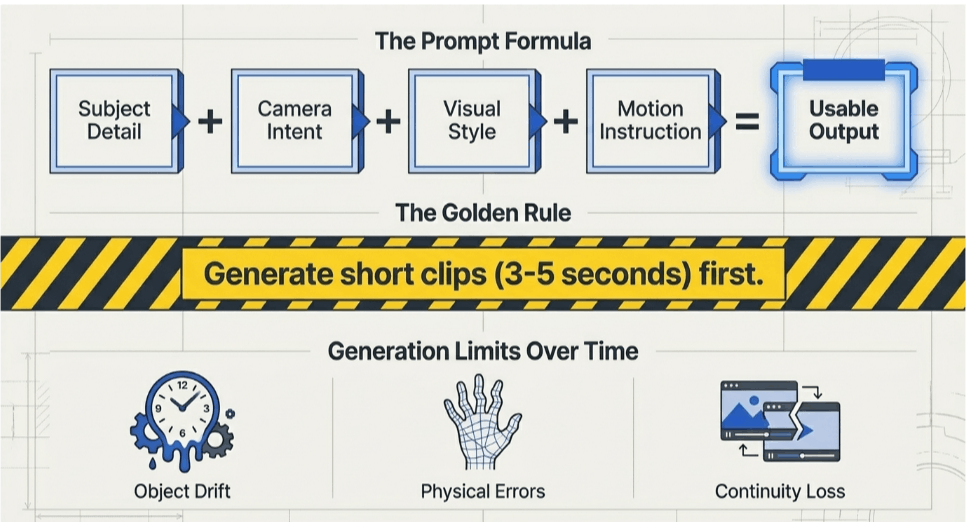
Text-to-video works best as one layer in a broader AI video system. Use it to fill visual gaps, prototype scenes, create B-roll alternatives, or test creative directions before committing to live production.
That is the practical frame for this category. It is a fast visual generator with clear strengths, clear failure points, and a very specific role inside a modern video workflow.
3. AI Avatar and Talking Head Video Tools
Avatar tools are the workhorse category of AI video for teams that need clear, repeatable communication at scale. They turn a script into a presenter-led video with a synthetic or cloned voice, a chosen background, and brand controls that stay consistent across dozens or hundreds of versions.
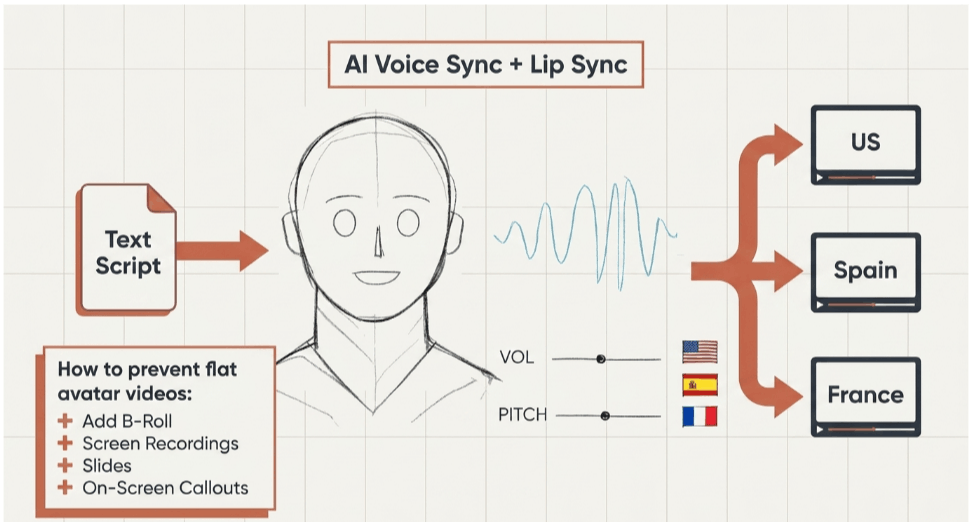
That makes them useful for a very specific part of the AI video system. They are built for delivery, versioning, and localization more than visual invention. If text-to-video helps create scenes, avatar tools help operationalize scripted communication.
The strongest fit is structured information. Training updates, policy changes, product walkthroughs, support explainers, and multilingual internal messages all benefit from a format that can be revised without booking talent, cameras, or studio time.
A legal team changes one sentence in the script. The video gets regenerated. That is a meaningful workflow advantage.
Where avatar tools fit best
Synthesia is widely used for training, onboarding, and explainer content. HeyGen is common in marketing demos, spokesperson-style videos, and localization workflows. D-ID is often used to animate a still image into a speaking presenter.
These tools usually perform well for:
compliance training.
product walkthroughs.
customer support explainers.
onboarding modules.
sales enablement videos.
multilingual internal updates.
The trade-off is straightforward. You gain speed, consistency, and easier localization. You give up some nuance, spontaneity, and human presence.
Script quality matters more here than in almost any other AI video category. Flat writing produces flat delivery. Short sentences, natural phrasing, and clear beats improve pacing and lip-sync perception.
I usually treat the script as both the narration and the edit plan, because every awkward clause becomes more obvious once an avatar says it out loud.
What makes avatar videos usable, not just publishable
A single synthetic presenter on screen for two minutes gets repetitive fast. Strong avatar videos break that pattern with B-roll, screen recordings, slides, UI close-ups, captions, and on-screen callouts. The avatar carries the core message. Supporting visuals carry attention.
This is a good point to see the format in action:
There is also a trust threshold to manage. Avatar delivery works well for standardized information and frequent updates. It is a weaker choice for founder announcements, customer stories, sensitive HR communication, or any message where credibility depends on visible human presence.
In those cases, a real person on camera usually performs better, even if production takes longer.
4. AI Video Editing and Post-Production Workflow
AI video editing is where the category becomes practical for day-to-day production. Fully generated video still has quality limits in many business settings. Editing tools, by contrast, solve obvious workflow problems right now.
They cut time spent on repetitive post-production tasks. They also reduce the amount of manual work required to turn one recording into multiple publishable assets.
Where AI editing actually helps
The strongest use cases are operational. Transcription, subtitle generation, silence trimming, filler-word removal, scene detection, translation, clip extraction, reframing, background cleanup, and rough-cut assembly all fit well because the system is handling pattern recognition, not editorial judgment.
That distinction matters. AI is good at finding pauses and turning speech into text. It is less reliable at deciding what your strongest argument is, where a story should breathe, or which line carries the emotional weight of a segment.
Different tools tend to specialize. Opus Clip is commonly used for pulling short highlights from long-form footage. Kapwing helps with captions, resizing, and team collaboration. Runway is stronger on cleanup tasks such as masking and background work.
A practical workflow
A working post-production system usually looks like this:
Capture once: Record a webinar, interview, walkthrough, lesson, or customer call.
Transcribe first: Edit from the transcript to remove mistakes, tighten pacing, and mark usable sections quickly.
Build a rough cut: Let AI handle first-pass cleanup, captions, dead air removal, and basic sequencing.
Create derivatives: Pull shorts, teaser clips, quote videos, and subtitled cut-downs from the same source file.
Format by channel: Export vertical, square, and widescreen versions based on where the video will be published.
A single solid-source recording can support distribution across YouTube, LinkedIn, TikTok, internal training libraries, paid social, and sales follow-up without editing each version from scratch.
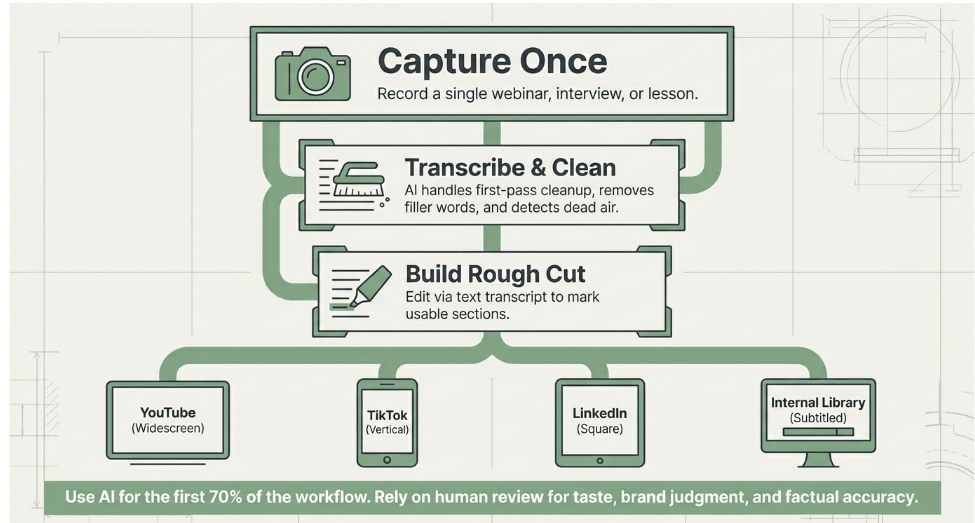
AI editing is usually less about creating a video from nothing and more about making one good recording usable across many contexts.
The failure point is over-trust. Auto-selected highlights often miss setup or context. Captions regularly misread product names, acronyms, and industry terms. Silence removal can make a speaker sound abrupt. Translation can preserve the words while losing the intended tone.
The practical rule is simple. Use AI for the first 70 percent of the workflow, then apply human review where taste, brand judgment, and factual accuracy matter.
That is the pattern behind the broader AI video ecosystem. The tools work best when you assign them the right part of the job.
5. AI Video Use Cases and Industry Applications
AI video earns its place when speed, versioning, and update frequency matter more than cinematic production. The strongest use cases are not the most impressive demos. They are the repeatable jobs that would otherwise stall because filming, editing, approvals, or localization take too long.
That makes AI video less of a single category and more of an operating layer across the video stack. Text-to-video, avatars, voice, translation, repurposing, and automated editing each solve different production problems. The practical question is not "Can AI make this?" It is "Which part of this video process should AI handle, and which part still needs a person?"
Where AI video fits best
For solo creators and media teams, AI video works well in formats built around consistency. Short-form explainers, faceless educational clips, commentary videos, product roundups, and templated channel series are good fits because the structure repeats.
Once the script format, visual style, and publishing cadence are set, AI can reduce production time across every new episode.
Marketing teams usually get the most value from variation at scale:
Paid social testing: Create multiple hooks, offers, aspect ratios, and language versions without planning a new shoot for each test.
Product explainers: Combine screen captures, simple motion graphics, avatar narration, and generated B-roll to ship updates faster.
Localization: Adapt one approved script into regional versions for sales, support, and campaign distribution.
Lifecycle content: Build onboarding videos, feature announcements, renewal support assets, and customer education from the same source material.
Training and internal communications are another strong fit. A policy update, process change, or software walkthrough often does not justify a camera crew.
Teams can convert scripts, slide decks, and existing documentation into usable video faster than they can schedule live production, especially when content changes often.
Industry-specific applications
Different industries use AI video for different tasks.
E-commerce teams use it for product promos, UGC-style ad variations, localized offers, and catalog content.
SaaS companies use it for onboarding, release communication, feature education, and help-center video.
Sales teams use short personalized intros and follow-up explainers where a full custom edit would be too expensive.
HR and L&D teams use it for policy training, role-based onboarding, and recurring internal education.
Real estate teams use it for listing summaries, neighborhood overviews, and fast-turn social content tied to active inventory.
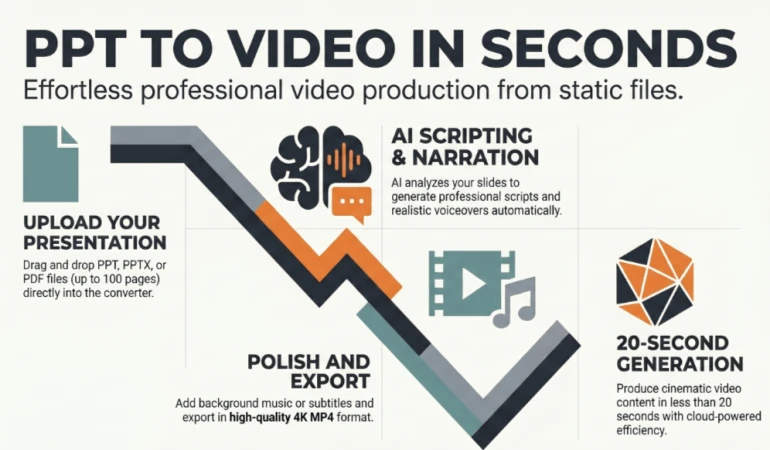
Presentation-to-video workflows are also gaining traction in business settings. That pattern makes sense. A large share of business knowledge already exists in decks, SOPs, and training files, so converting those assets into watchable video is often more practical than creating something from scratch.
Where AI video underperforms
Some formats still lose too much when automation does the heavy lifting.
Executive messaging, sensitive customer communication, documentary-style storytelling, testimonial videos, and any format that depends on lived credibility usually perform better with real people on camera.
The issue is not only realism. It is trust. If the audience needs to read emotion, conviction, nuance, or proof, synthetic delivery can flatten the message.
I also would not force AI video into use cases that depend on unpredictable conversation or physical demonstration. Product reviews, field footage, event coverage, and interview-based stories usually need actual capture, then selective AI support in post.
A practical way to choose the right AI video use case
Use AI video when the job has four traits: repeatable structure, clear script control, frequent updates, and multi-channel distribution. Avoid heavy automation when the job depends on authenticity, legal sensitivity, or visual evidence.
That distinction helps make sense of the whole AI video ecosystem covered in this article. The technology matters. The tool category matters. The workflow matters. But adoption usually succeeds or fails at the use-case level.
Teams get results when they match the tool to the production constraint, not when they try to automate video as a whole.
6. AI Video Ethics, Copyright, and Legal Considerations
Most glossy explainers often overlook the nuances of this topic. The practical risk in AI video isn't only output quality. It's rights, consent, disclosure, and brand safety.
The tool might generate something usable. That doesn't automatically make it safe to publish.
The key questions to ask before publishing
If you're using an avatar, was the likeness created with clear consent? If you're cloning a voice, do you have permission? If a model generates imagery that resembles a recognizable person, brand asset, or copyrighted style, what protection does the platform offer?
Publishing policy should be part of your workflow, not a last-minute approval step.
A few practical standards help:
Get written consent: Use signed approval for likeness, voice, and any cloned identity asset.
Review licenses: Check whether stock elements, voices, and outputs are cleared for commercial use.
Label when appropriate: Disclosure won't solve every legal issue, but it can reduce audience confusion and internal risk.
Keep source records: Save prompts, scripts, asset origins, and export dates in case your team needs an audit trail.
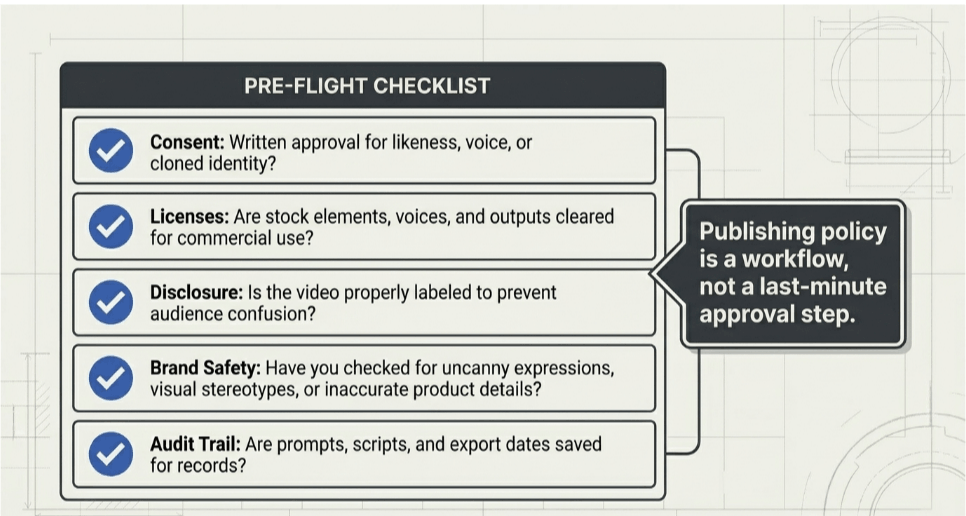
Brand safety matters too
Even when something is legally usable, it may still be off-brand. AI visuals can drift into uncanny expressions, mismatched hands, inaccurate product details, or visual stereotypes.
A beauty brand, healthcare provider, or financial company should review synthetic content much more carefully than a meme page would.
The simplest rule is to match review depth to business risk. The more regulated or reputation-sensitive the message is, the less you should rely on fully automated output.
7. AI Video Platform Comparison Matrix
Picking an AI video platform by homepage demo produces bad tool decisions. The right comparison starts with the production job you need to improve.
AI video is not one product category. It is a stack that includes generators, avatar systems, editing tools, dubbing platforms, and workflow layers for review or automation.
If you use one comparison table for all of them, the result is usually confusion. A creative team testing Runway is solving a different problem from an L&D team using Synthesia, or a podcast team working in Descript.
Use the matrix around operating fit.
Compare platforms by the production constraint
A practical evaluation lens looks like this:
Primary output type: Cinematic clips, avatar presentations, repurposed edits, translated versions, or short-form social assets.
Generation quality: Publishable output, concept-grade output, or something that still needs heavy cleanup.
Control: Prompt guidance, reference images, scene timing, brand styling, and revision options.
Editing depth: Subtitles, dubbing, resizing, timeline editing, cleanup tools, and export formats.
Team workflow: Comments, approvals, shared templates, brand controls, permissions, and API access.
Risk profile: Consent handling, voice and likeness controls, commercial rights terms, and auditability.
That last category gets missed a lot. In practice, it often decides whether a platform is usable for a real team or only for experiments.
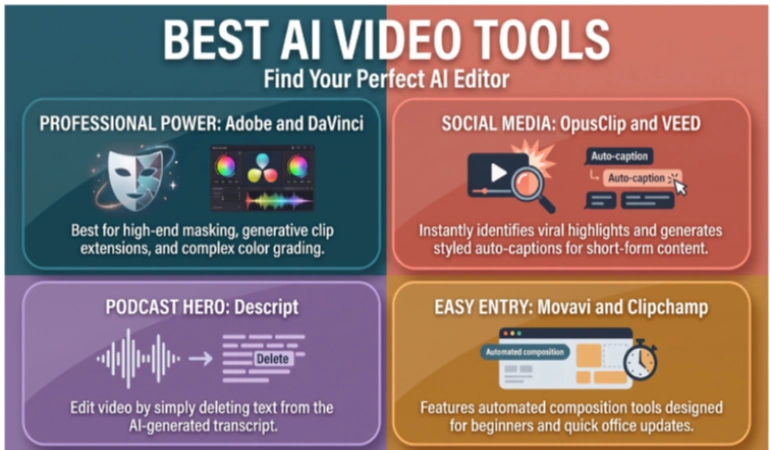
Runway may fit a creative team producing stylized ad assets or concept visuals. Synthesia may fit internal communications, onboarding, or training. Descript may fit webinar, podcast, or interview workflows where source footage already exists. Kapwing may suit collaborative social production. Adobe Firefly may make more sense for teams that already build inside Adobe and want AI video as part of a broader content pipeline.
For a curated list of top-performing software, see our guide on the best AI video tools that really work.
What usually separates a good fit from a bad one
The biggest difference is rarely raw output quality alone. It is the amount of manual correction the tool creates after the first draft.
A platform that makes impressive demos but weak revisions can slow a team down. The same goes for tools that generate quickly but break brand consistency, handle text poorly, or make scene-level edits difficult. In real production, those limits matter more than flashy first renders.
Ask which platform removes recurring work from your current process, supports your review standard, and holds up under revision.
Cloud delivery also matters for many teams because rendering, collaboration, and approvals often happen across functions. Local tools still have a place, especially for final polish or sensitive footage, but shared access usually wins for distributed production.
The simplest matrix is the most useful one. Test each platform on your own script, footage, brand rules, and approval path. Demo examples show what a tool can do under ideal conditions. A real trial shows what your team can ship with it.
8. Quickstart Summary and Next Steps
AI video is not one product. It is a production system made up of generation, avatars, editing, repurposing, review, and governance choices. If the first seven sections gave you the map, this section is the starting plan.
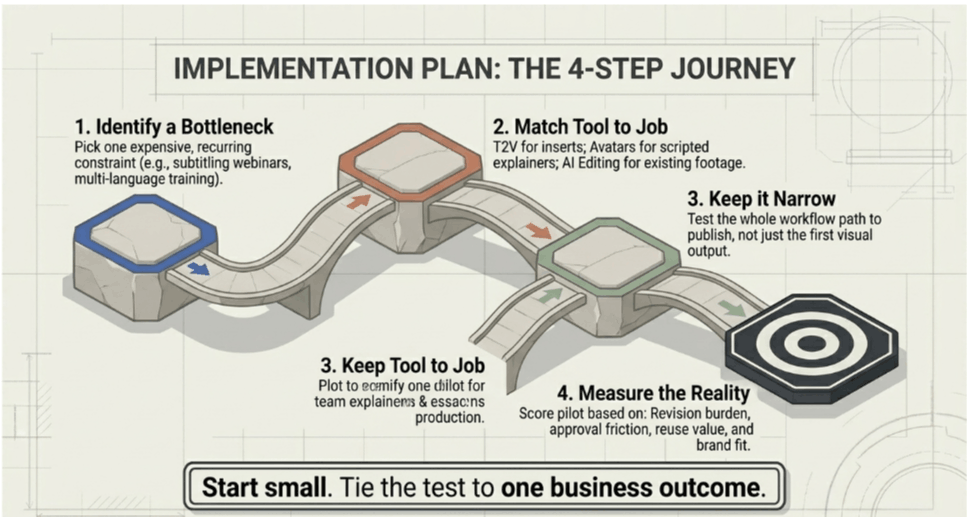
Start small and tie the test to one business outcome.
The best first pilot usually targets a repetitive job with clear before-and-after effort. Good candidates include subtitling webinar clips, turning one blog post into short explainers, producing multiple ad variations from one offer, or localizing a single training module.
Those use cases expose the strengths and limits of AI video without forcing a full process change.
Choose one tool category based on the job:
Text-to-video for visual inserts, concept scenes, or fast creative variations.
Avatar video for scripted explainers, internal training, or multilingual presenter-led content.
AI editing for teams that already have footage and need faster clipping, cleanup, captions, or versioning.
Keep the pilot narrow enough that your team can judge the whole workflow, not just the first output.
In practice, the main question is whether the tool removes recurring production work or shifts that work into cleanup, approvals, and revision rounds. We discuss fully how to choose an AI video tool in this guide.
What to measure in a pilot
Use a simple scorecard and review the full path to publish:
Revision burden: How much manual correction did the draft create?
Approval friction: Did legal, brand, or subject-matter reviewers accept the format?
Reuse value: Could one script, recording, or source asset produce multiple deliverables?
Brand fit: Did the result match your visual standards, voice, and claims process?
Operational fit: Could the team repeat the process next month without specialist help?
A strong pilot gives you a repeatable workflow, a realistic cost of oversight, and a clearer view of where AI belongs in your video stack. A weak pilot usually tries to test every category at once, which hides trade-offs.
Your Next Step From Understanding to Implementation
AI video moved from niche experiment to mainstream production tool fast. Meta's Make-A-Video launched in September 2022 as a consumer-accessible text-to-video system and later evolved into Movie Gen, a 30 billion-parameter model that can generate 16-second HD clips, a sign of how quickly the category matured according to Quantumrun's roundup of Make-A-Video statistics.
The strongest teams don't start by replacing their entire video function. They start by identifying one expensive, recurring bottleneck and assigning AI to that specific job.
That might be turning webinars into short clips, creating multilingual training updates, generating ad variations for testing, or producing first-draft visuals for a product launch.
That narrow approach matters because AI video isn't one capability. It's a stack. Text-to-video, avatars, AI editing, translation, subtitling, and repurposing each have different strengths. When teams fail with AI video, it's often because they choose a tool based on demos instead of matching it to real production constraints.

Lahaga Aondowase
I'm passionate about empowering creators through the power of AI. As the founder of AI Video Tools Pro, I aim to banish the time-wasting struggle of finding the perfect AI video tools for your content creation.
Related Articles
View All

User Comments (0)

