
How AI Video Tools Can Turn Helpful Videos Into Brand Searches and Website Traffic
Creating short-form video can sometimes feel like shouting into an empty room. You can use an AI video generator to make polished clips in minutes, publish them across several platforms, and still watch the views pile up without seeing much movement in your website traffic. The problem is not necessarily the amount of video you produce. It is whether those videos give people a reason to remember your brand and look for you again. When a useful video answers a problem clearly, viewers have a reason to remember who helped them. Some will visit the website immediately. Others may search for the brand or product later.
August 12, 2026 11:58
We’ll look at how that process works, from choosing topics worth turning into videos to using AI to create content that builds brand interest.
Why Helpful AI Videos Can Generate Brand Interest
Think about your own browsing habits. If you see a funny video, you might enjoy it for a few seconds, leave a like, and keep scrolling. But if you find a short tutorial that solves a problem you have been wrestling with all week, you are much more likely to remember the company that showed you how to fix it.
That is where AI video can become particularly useful. The technology makes it easier to turn useful information into video without requiring a large production team or hours of manual editing. Good video traffic strategies start with this same principle: give viewers something genuinely useful before asking them to visit your website.
A business can use an AI video tool like Guidde to create an explainer about a complicated product, turn a frequently asked question into a short tutorial, demonstrate how a feature works, or create several versions of the same educational idea for different platforms.
The important distinction is that AI is helping produce the content; it is not the reason the content is valuable.
Educational and demonstration videos work because they solve a problem. When you consistently help people understand something, complete a task, or make a better decision, you create a stronger association between that useful information and your brand.
The goal is simple: use AI to make useful video content easier to create consistently.
How to Find Problems Worth Turning Into AI Videos
The best AI video ideas usually start with questions, not with the video tool itself.
Start with the things your customers already ask. Look at support tickets, comments, product reviews, search queries, and conversations with your sales team. These sources can reveal problems that people are actively trying to solve.
You can also look at your existing website content. A detailed guide may contain several smaller questions that could each become a useful short-form video.
For example, an article about choosing the right project management software could become several videos:
Three signs your team has outgrown spreadsheets.
How to choose project management software.
The difference between task management and project management.
Three features small teams actually need.
Common project management mistakes to avoid.
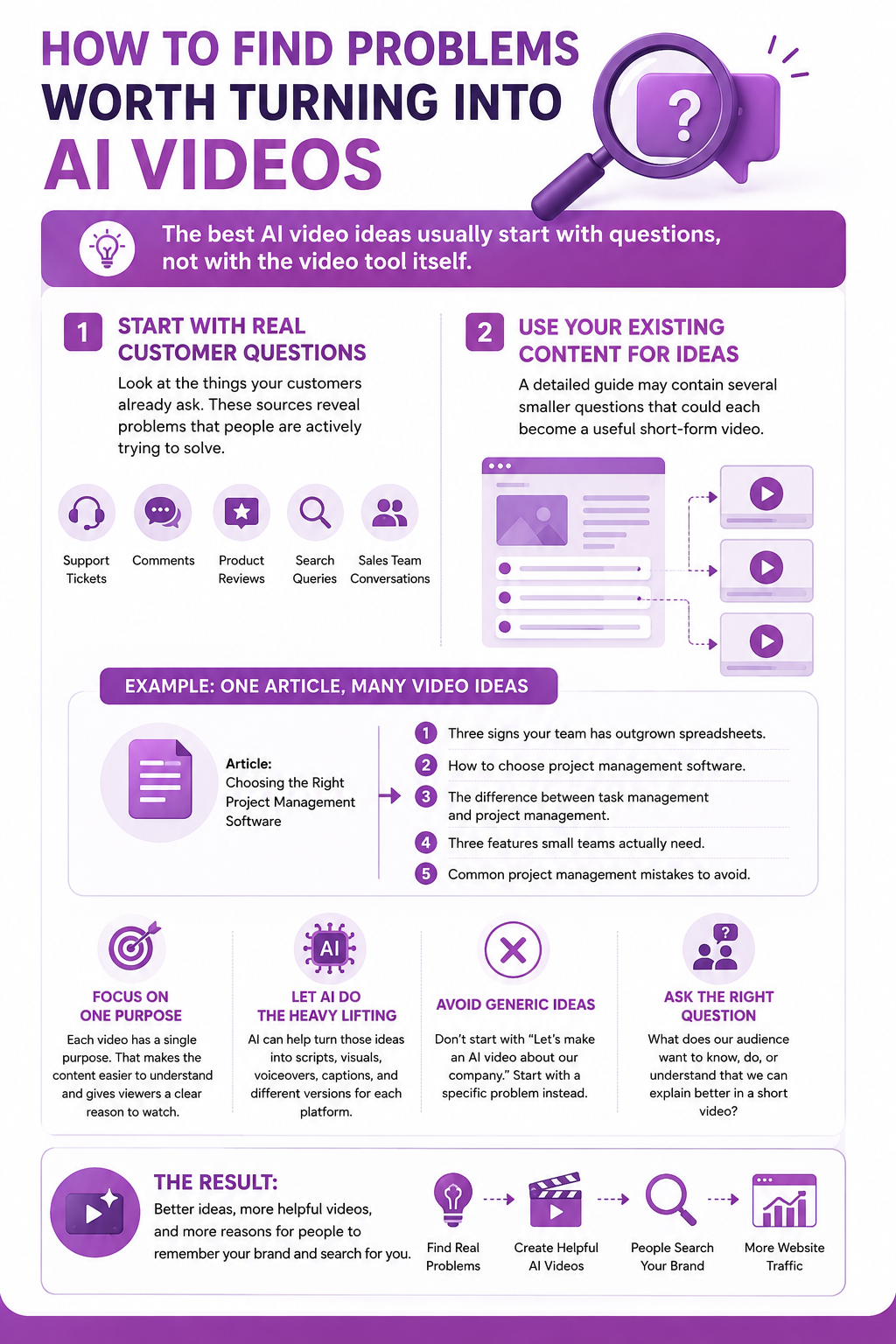
Each video has a single purpose. That makes the content easier to understand and gives viewers a clear reason to watch.
AI can then help turn those ideas into scripts, visuals, voiceovers, captions, and different versions for each platform.
The important thing is to avoid starting with a generic idea such as "Let's make an AI video about our company." Start with a specific problem instead.
A useful question to ask is:
What does our audience want to know, do, or understand that we can explain better in a short video?
That question will usually produce better content than simply asking which AI video trend you should follow.
How to Create Helpful Marketing Videos With AI
Once you have a useful topic, AI can speed up almost every part of the production process.
The first step is to turn the audience's problem into a focused video concept. Avoid trying to explain an entire subject in 30 or 60 seconds. Choose one question and answer it clearly.
From there, different types of AI video tools can handle different parts of the workflow.
AI writing tools can help turn your idea into a concise script. They are particularly useful when you already know what you want to explain but need help structuring the information for a short video. Tools like VideoExpress AI, FlexClip, Veed, and BigMotion can help you with that.
AI video generators can create visual scenes from text prompts or scripts. This can be useful when you need supporting visuals but do not have the time or budget to record everything yourself. Invideo AI, Pictory AI, Revid AI, Magiclight, etc., can generate videos from text prompts.
AI avatar tools like HeyGen, Synthesia, Vidnoz AI, Avatar Builder, and HumanPal can turn a script into a presenter-led video without requiring someone to appear on camera. This can work well for tutorials, announcements, and educational content.
AI voice generators can provide narration when you do not want to record your own voice. ElevenLabs allows you to produce different language versions of the same content.
AI video editors such as Descript, Adobe Premiere Pro, DaVinci Resolve, SSemble, and Gling AI can help with captions, trimming, resizing, scene selection, and other repetitive editing tasks. This is particularly useful when one long video needs to become several short clips.
AI video translation tools can help adapt successful videos for audiences in other languages, allowing a useful piece of content to reach more potential customers.
The right workflow depends on the type of video you are creating. You might use one tool for the script, another for video generation, and another for editing. The objective is not to use as many AI tools as possible. It is to use the right tools to produce a useful video efficiently.
7 Types of AI Videos That Can Make People Search for Your Brand
Not every AI-generated video is equally useful for building brand interest. Content that teaches, demonstrates, or helps people make decisions has a natural advantage because it gives viewers a reason to remember where the information came from.
1. AI-Generated Tutorials
Tutorials answer a specific question or show viewers how to complete a task.
A software company, for example, could create a 45-second video showing how to export a report, connect an integration, or solve a common setup problem.
The more specific the tutorial, the easier it is for the viewer to understand its value.
2. Product Demonstrations
Instead of simply telling people what your product does, show them.
AI video tools can help businesses create demonstrations that explain features, workflows, and use cases. For products that are difficult to record physically, AI-generated visuals can also provide supporting scenes.
A viewer who sees a useful demonstration may later search for the product name when they are ready to investigate it further.
3. AI Comparison Videos
Comparison content can help viewers who are already researching a purchase.
You could compare two approaches to solving the same problem, explain the differences between product features, or show which option is more suitable for a particular type of user.
The important thing is to provide genuine information rather than turning the video into a sales pitch.
4. AI Avatar Explainers
AI avatars can present educational information without requiring a presenter to record every video.
They can be useful for software walkthroughs, product explanations, onboarding content, and short educational clips.
However, the script still needs to sound natural. An AI avatar cannot make a weak explanation more useful simply by presenting it.
5. AI UGC-Style Product Videos
Businesses can also use AI video tools to create user-generated-content-style videos for products and services.
These videos can focus on a problem, demonstrate a product, or explain a particular use case in a conversational format.
The goal should be to make the product easier to understand, not simply to imitate whatever UGC format happens to be trending.
6. Blog-to-Video Content
Your existing website content is another source of video ideas.
A detailed article can be turned into several short videos, each covering one important point. AI tools like Pictory AI can help extract key ideas, generate scripts, create visuals, and produce different formats.
This creates a useful connection between your existing search content and your video strategy.
A viewer who discovers one of these videos may search for the brand to find the full article, guide, or resource.
7. Localized AI Videos
A useful video does not have to remain in one language.
AI subtitle, caption, and voice tools can help businesses adapt successful videos for new markets. This allows a company to reuse a proven idea while making it accessible to a different audience.
The important part is to localize the message rather than simply translating every word. Examples, terminology, and calls to action may need to change depending on the audience.
How to Make Your AI Videos Memorable
Creating a useful AI video is only half the job. If viewers cannot remember who created it, the value of that video may stop when they scroll away.
The viewer should be able to answer two simple questions after the video ends: who helped me, and what do they help with?
Introduce the brand naturally rather than turning the video into an advertisement. A simple line such as "Here is how we handle this at Acme Analytics" can connect the information with a name without interrupting the lesson.
Visual consistency helps too. Use recognizable colors, logos, product interfaces, captions, and presentation styles across your AI-generated videos. Viewers may not remember every detail of a 30-second clip, but repeated visual and verbal cues can make the brand easier to recognize later.
The same principle applies to AI avatars and synthetic voices. If your videos use an AI presenter, voice, or recurring visual style, keep the experience consistent enough that viewers begin to associate it with your company.
Your website destination should also be specific. Instead of saying "Visit our website," point viewers toward something useful: a detailed guide, product comparison, free template, calculator, demo, or extended tutorial.
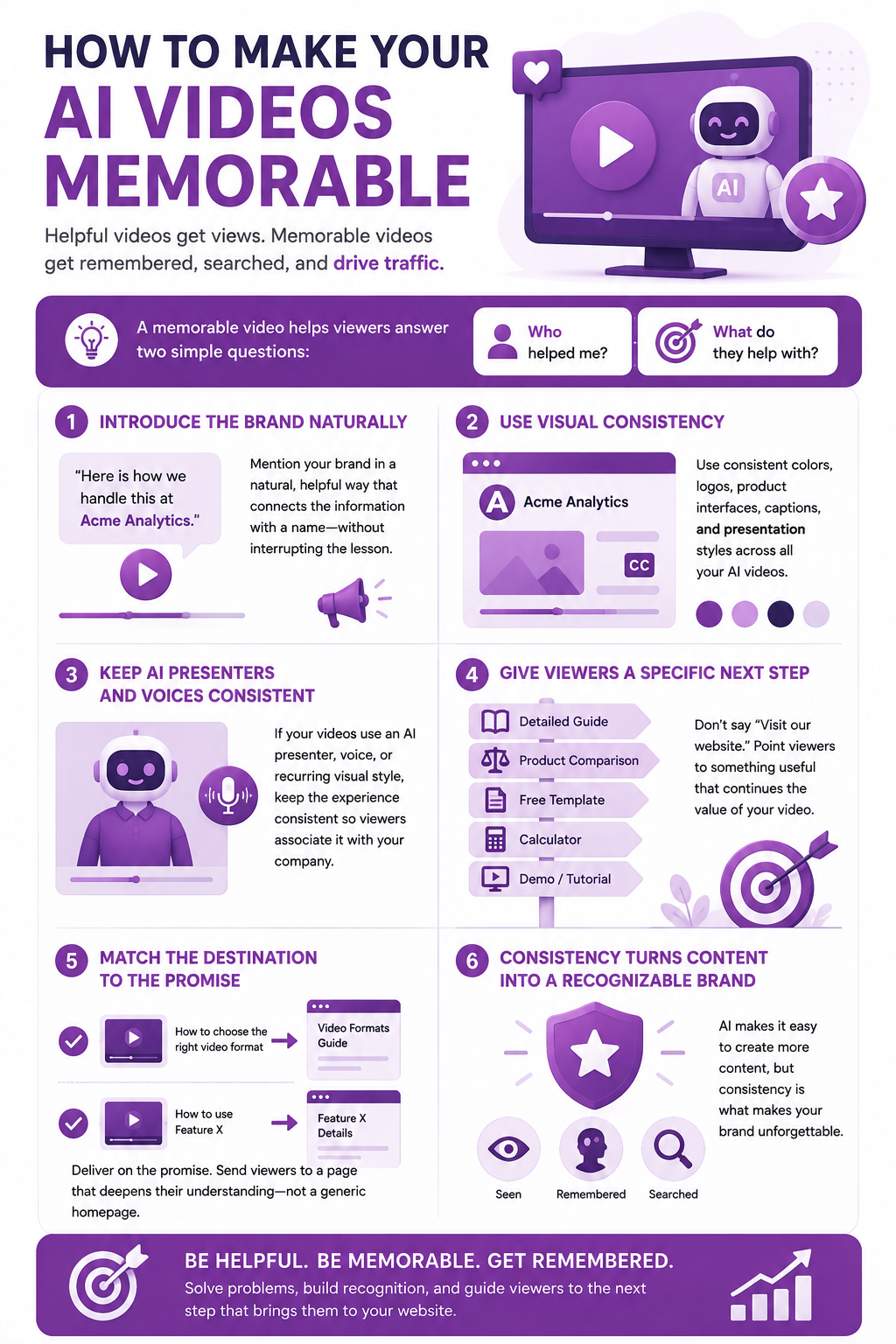
The destination should match the promise made in the video. A video explaining how to choose the right video format should lead to a useful guide about video formats, not a generic homepage. A video demonstrating a particular product feature should lead to the page where viewers can learn more about that feature.
AI makes it easier to produce large amounts of content, but consistency is what helps turn that content into a recognizable brand.
How AI Videos Turn Viewers Into Website Visitors
The path from an AI video to a website visit is not always as direct as clicking a link.
Some viewers will click a profile link or call to action immediately. Others will remember the company and search for it later. A third group may see the video, do nothing at first, and return to the website days later after seeing another piece of content.
This is especially important for short-form video. A viewer might discover your brand on one platform but choose to use Google when they are ready to investigate the company.
That means a successful AI video strategy should not focus only on referral traffic. It should also consider whether the videos are creating enough interest for people to search for the brand, product, or resource.
For example, imagine a company creates an AI-generated video explaining three common mistakes people make when choosing accounting software. The video does not need to push a product aggressively. It simply provides useful information and makes the company name clear.
A viewer who finds the advice useful may later search for the company, visit its website, and read a more detailed guide before making a purchase.
This is why the relationship between video, search, and website traffic can be difficult to see in a standard analytics report. The original video may not appear as the final referral source even though it helped start the journey.
AI video can make this process more scalable because a business can turn one useful idea into multiple videos, formats, and variations. But the objective remains the same: create enough value that viewers have a reason to continue the relationship beyond the platform.
How to Choose the Right AI Video Tool for Your Marketing Goal
There is no single AI video tool that is best for every type of marketing content. The right choice depends on what you are trying to create.
The important thing is to start with the content requirement rather than the tool.
Ask what you need to produce repeatedly:
Do you need product demonstrations?
Do you need short educational videos?
Do you need an AI presenter?
Do you need videos from text prompts?
Do you need to turn articles into videos?
Do you need to repurpose long-form content?
Do you need multiple language versions?
Once you know the answer, it becomes much easier to find an AI video tool that fits the workflow.
It is also worth testing the quality of the output before committing to a tool. Look at visual consistency, editing controls, voice quality, export options, available formats, and how much manual work is still required after generation.
The most impressive AI video demo is not necessarily the most useful tool. For marketing teams, the better choice is often the tool that can reliably produce the type of helpful content they need week after week.
How to Measure Whether AI Videos Are Driving Brand Searches
Knowing that AI videos can create brand interest is useful, but you still need evidence that the strategy is working.
Start by establishing a baseline before publishing a new video series. Record your existing branded search impressions, branded search clicks, and website traffic for several weeks. You can then compare those numbers with the period after your videos are published.
Google Search Console can help you monitor searches containing your brand name, product names, and other branded terms. Look for changes in impressions and clicks rather than focusing on one unusual day.
Google Analytics 4 can provide another part of the picture. Add consistent UTM parameters to clickable links used in your video profiles, descriptions, and campaigns. This allows you to compare sessions, engaged sessions, and returning visitors by source and campaign.
Keep your campaign naming consistent. If one video uses "youtube," another uses "YouTube", and another uses "yt," your analytics data can become unnecessarily difficult to compare.
Direct traffic also deserves attention, but it should be interpreted carefully. A visitor who remembers your brand after watching an AI video might type the website address directly. However, direct traffic can also include bookmarks, untagged links, and other visits where the source was not recorded.
Google Trends can provide another directional signal. A rise in searches for your brand around the time a video campaign launches can indicate increased interest, although Trends data should not be treated as an exact measure of website visits.
The strongest approach is to bring several signals together:
Branded search impressions
Branded search clicks
Website sessions
Referral traffic
Direct traffic
Returning visitors
Video publication dates
Conversions or signups
A rise across several of these metrics is more meaningful than a single increase in views.
Don't Let AI Make Your Videos Generic
AI can make video production faster, but faster production does not automatically mean better content.
One of the biggest risks of AI-generated video is creating content that looks polished but feels interchangeable. Generic scripts, predictable visuals, and exaggerated claims can make a video easy to ignore.
Human input is still important.
Review AI-generated scripts for accuracy and usefulness. Check that product information is correct. Replace generic examples with real ones. Add your own experience, opinions, or demonstrations where they make the content more valuable.
Brand consistency matters as well. If every video uses a different voice, visual style, and message, producing more content may not make the brand more memorable.
The best use of AI is often to remove repetitive production work while allowing people to focus on the parts that require judgment.
AI can help you generate a first draft, create visuals, edit clips, add captions, or produce different versions. A human can then decide whether the result is actually worth watching.
This distinction matters because viewers do not care whether a video was made with AI. They care whether it answers their question, teaches them something useful, or helps them make a better decision.
When AI is used to make genuinely helpful content easier to produce, it becomes more than a shortcut for creating videos. It becomes a practical way to build a consistent content strategy that keeps your brand in front of the people most likely to need what you offer.
A Practical AI Video Workflow for Building Website Traffic
A useful AI video strategy does not need to be complicated. The process can start with one customer question and grow into a repeatable content workflow.
Begin by choosing a problem your audience is already trying to solve. Search queries, customer questions, support conversations, and existing website content can all provide ideas.
Next, turn that problem into one focused video. Write a short script that answers the question without trying to cover everything at once. AI writing tools can help organize the script, but the final version should still reflect your own knowledge and experience.
Choose the AI video tools based on what the video requires. You might use an AI avatar for a presenter-led tutorial, a text-to-video generator for visual scenes, an AI voice tool for narration, or an AI editor to create captions and short versions.
Once the video is generated, review it before publishing. Check the facts, visuals, voiceover, branding, and pacing. AI can speed up production, but a few minutes of human review can make the difference between content that feels useful and content that feels automated.
Publish the video where your audience is most likely to see it. Then give viewers a clear next step. That could be a detailed article, product page, comparison guide, free resource, or another relevant piece of content.
Finally, record what happens after publication. Look for changes in branded searches, website visits, engagement, and conversions rather than judging the campaign only by the number of views.
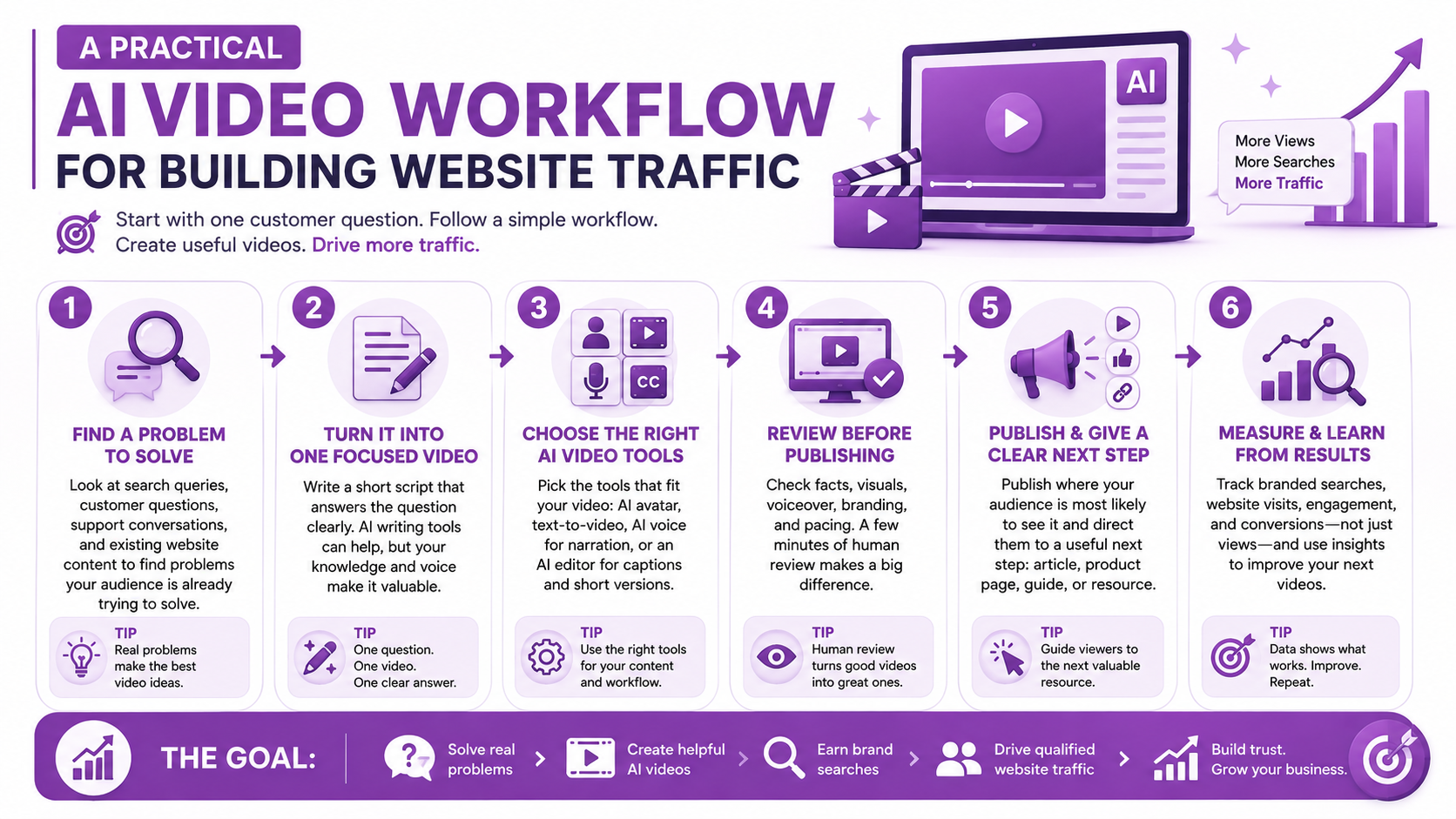
The process can then be repeated with another customer question. Over time, a single useful idea can become a series of videos that consistently introduce people to your brand.
Choosing AI Video Tools Based on the Job
The growing number of AI video tools can make the selection process confusing. New platforms appear regularly, and many offer overlapping features.
Instead of choosing a tool because it is popular, start with the job you need it to perform.
If you need to create videos from written prompts, look at AI text-to-video generators. If your content needs a virtual presenter, compare AI avatar platforms. If your goal is short product-focused content, AI UGC tools may be more appropriate.
For existing footage, an AI video editor can help with cutting, captions, resizing, and repurposing. If your audience speaks different languages, AI translation and dubbing tools can help you adapt successful videos without rebuilding the entire production from scratch.
The best choice also depends on factors such as output quality, editing controls, generation limits, available formats, voice quality, and how much manual editing is required after the AI has finished generating the video.
This is why comparing AI video tools by their actual use case is often more useful than simply looking at which platform has the longest feature list.
A tool that produces impressive demonstrations but does not fit your workflow may save less time than a simpler platform that reliably produces the videos you need every week.
Turning One AI Video Into a Content Series
One of the biggest advantages of AI-assisted video production is the ability to build more content from a single useful idea.
Suppose you create a video explaining how to choose an AI video generator. That one topic could become several smaller pieces of content.
You could create a short video explaining the most important feature to look for, another comparing different types of AI video generators, and another showing common mistakes beginners make.
The original video could also become a longer tutorial, a blog article, a social media clip, or a translated version for another audience.
This approach is more useful than creating unrelated videos simply to maintain a publishing schedule. Each piece of content reinforces the same subject while giving viewers multiple opportunities to discover your brand.
AI repurposing tools can make this repurposing process faster, but the underlying ideas should remain connected. A collection of random AI-generated videos may produce views, while a focused series can build recognition around a particular subject.
Keep the Human Expertise in AI-Generated Video
AI can handle many repetitive parts of video production, but it should not be responsible for the entire message.
This is especially important when videos cover products, technical subjects, finance, health, or other areas where inaccurate information can cause problems.
Review AI-generated scripts before publishing. Confirm statistics, product claims, and instructions against reliable sources. If a qualified professional is contributing to the content, make that expertise clear.
The same principle applies to demonstrations. If a video shows how a product works, make sure the AI-generated visuals do not suggest features that the actual product does not have.
Authenticity also matters. Viewers can become less interested when every video looks and sounds the same. Mixing AI-generated scenes with real product footage, screen recordings, original commentary, or demonstrations can make the content more useful and distinctive.
The goal is not to hide the use of AI. It is to use AI where it improves the production process while keeping the information accurate, relevant, and genuinely helpful.
What Successful AI Video Traffic Looks Like
A successful AI video campaign does not necessarily produce millions of views.
A smaller video that reaches the right audience can be more valuable than a viral clip that attracts people who have no interest in the product.
Look for signs that viewers are moving beyond the video itself. Are branded searches increasing? Are more people visiting the website? Are visitors spending time on the pages connected to the videos? Are some of them returning or signing up?
The strongest results often appear across several measurements rather than one large number.
A useful video might receive fewer views than an entertainment-focused clip but generate more qualified visitors because the people watching it have a genuine problem that the brand can solve.
That is the real opportunity with AI video. It can help businesses produce useful content consistently, but the goal is not simply to fill social feeds with more videos.
The goal is to create a connection between a useful answer, a memorable brand, and a website where the viewer can continue learning or take action.
Conclusion
Helpful video has always been about giving people a reason to stop scrolling. AI video tools make it easier to create that kind of content consistently, but the technology itself is not what drives results.
Start with a real question your audience wants answered. Use AI to turn that question into a clear tutorial, demonstration, explainer, or other useful video. Make the brand easy to remember, connect the video to a relevant resource on your website, and give viewers a reason to continue the journey.
Then measure what happens after publication. Look beyond views and likes to branded searches, website visits, returning visitors, and conversions. A video that generates fewer views but attracts people who genuinely need what you offer can be far more valuable than a viral clip with no connection to your business.
Frequently Asked Questions
Let’s take on some questions we often get about getting traffic from AI videos.
Can AI-generated videos increase website traffic?
Yes. AI-generated videos can drive website traffic when they answer questions your target audience is already searching for. A useful video can introduce your brand, encourage viewers to search for more information, and direct interested viewers to a relevant page on your website.
What types of AI videos are best for marketing?
Tutorials, product demonstrations, explainers, comparison videos, AI UGC-style videos, and short educational videos can all work well. The best format depends on what your audience needs to understand and what action you want viewers to take.
Can AI videos increase branded searches?
They can. A viewer may watch a useful video, remember the brand, and search for it later rather than clicking a link immediately. This is why branded search activity can be an important measurement alongside video views and referral traffic.
Which AI video tools should businesses use?
There is no single best tool for every business. Choose based on the type of content you need to produce. An AI video generator may be suitable for text-to-video content, while an AI avatar tool may work better for presenter-led videos.
How do you measure traffic from AI videos?
Use several signals together. Track video engagement, branded search impressions and clicks, website sessions, referral traffic, direct traffic, and conversions. Consistent UTM parameters can also help identify visits from links associated with your video campaigns.
Should businesses use AI-generated video instead of real footage?
Not necessarily. AI and real footage can work together. AI is useful for generating scenes, presenters, voiceovers, edits, and variations, while real product footage, demonstrations, and original commentary can add credibility and authenticity. The best approach depends on the content and audience.

Lahaga Aondowase
I'm passionate about empowering creators through the power of AI. As the founder of AI Video Tools Pro, I aim to banish the time-wasting struggle of finding the perfect AI video tools for your content creation.
Related Articles
View All


User Comments (0)

