Powtoon

PowToon AI Features
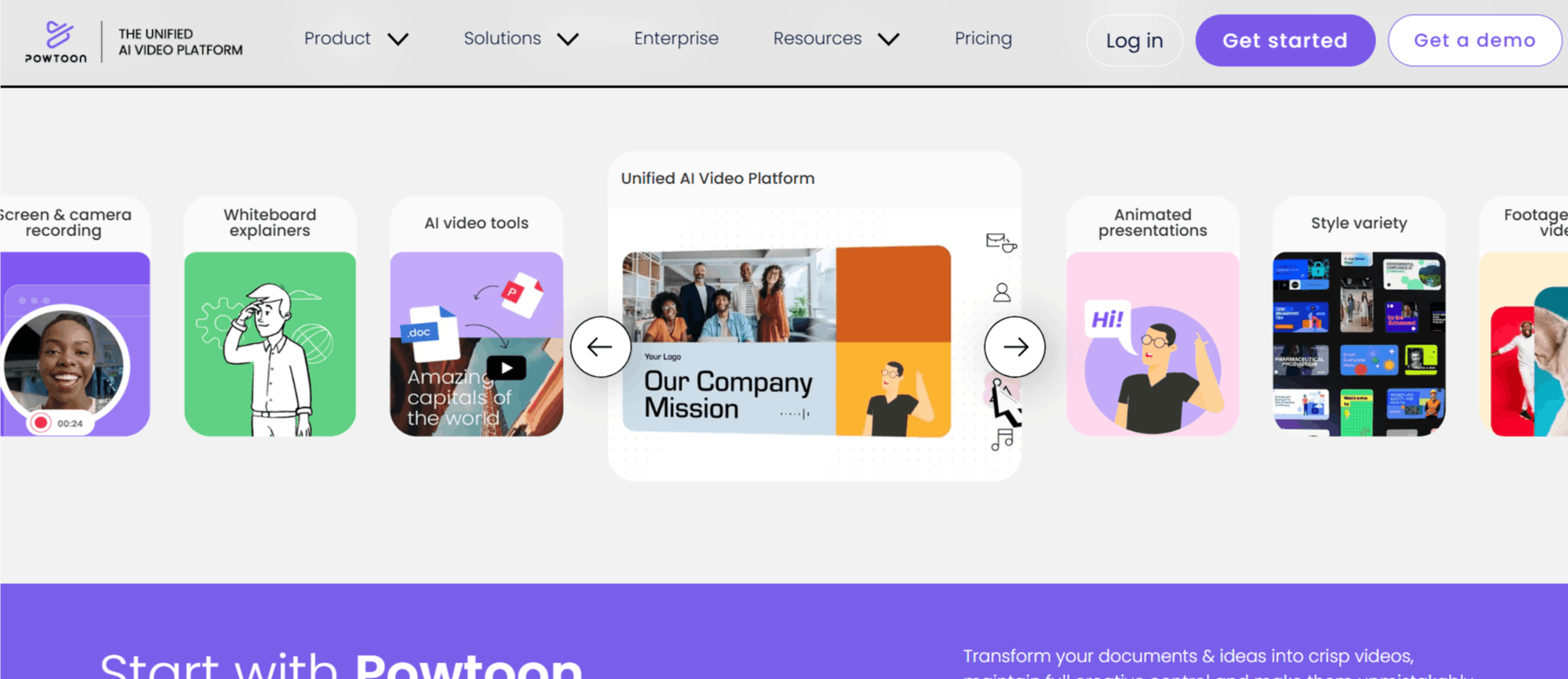
Powtoon offers several features that are for both beginners and advanced creators looking for specialized tools. From automated AI enhancements to granular editing controls, the platform is designed to make video production faster and more intuitive across different project types.
1. AI Anything to Video
This feature allows users to transform existing static documents, PDFs, and presentations into dynamic video content. By leveraging AI, the tool analyzes the provided file and structures it into a video format, which is particularly useful for those wondering how to use Powtoon to repurpose old company materials or lecture slides into engaging content.
2. AI Scriptwriter
Writing scripts is often the most time-consuming part of production. The built-in AI scriptwriter generates professional, context-aware scripts based on your specific creative requirements. This tool removes the initial writer's block, providing a solid foundation that users can refine before moving to the animation phase.
3. AI Avatars
Powtoon integrates lifelike AI avatars that support lip-syncing and multiple language options. These avatars add a human element to digital communications, such as training videos or corporate announcements, without the need for a real-world film crew or physical recording equipment.
4. AI Text-to-Speech
This tool converts written text into natural-sounding voiceovers. By removing the need for professional studio recording, it allows creators to add clear, consistent, and diverse vocal tracks to their projects quickly. It supports multiple languages and tones to match the specific needs of the audience.
5. Screen and Camera Recording
For users who need to show processes or provide feedback, the integrated recording suite is essential. It captures screen activity and webcam footage simultaneously, enabling the creation of clear software tutorials or personal video messages that feel authentic and immediate.
6. Animation and Asset Library
At its core, the platform remains a powerhouse for Powtoon animation. Users can access hundreds of professionally designed templates, characters, and objects that can be dragged into any scene. This library allows for high levels of customization, ensuring that even non-designers can produce visually appealing work.
7. Character Lip-Sync
Advanced users can utilize the character lip-syncing feature, which matches the movement of animated characters to imported voiceovers. This adds a layer of professionalism to characters, making animated explainers feel more interactive and polished.
8. Collaboration and Brand Management
For enterprise teams, the platform offers centralized brand management, including shared folders and corporate templates. This ensures that every member of the team can access the correct brand assets, keeping visual content consistent across the entire organization.
How PowToon Works
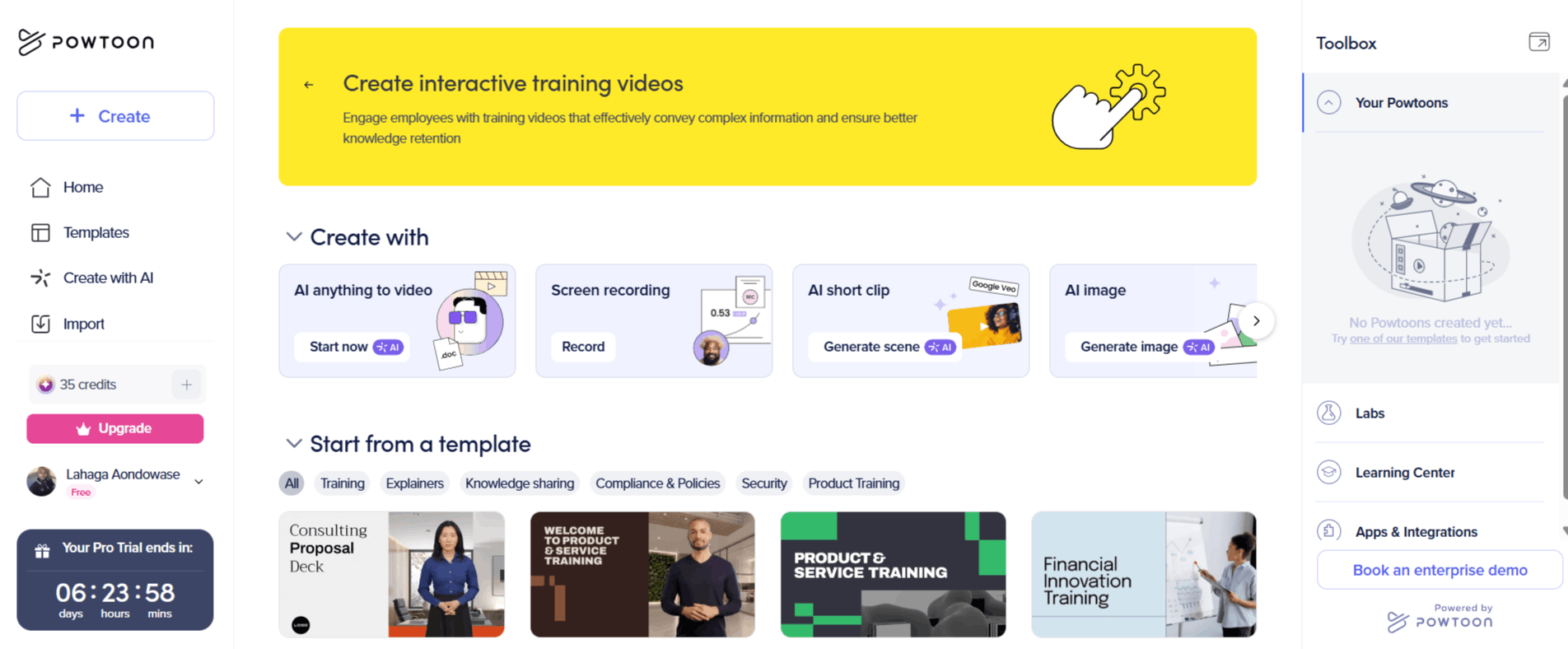
Starting your first project in the Powtoon Workspace is a straightforward process that guides you through the stages of production. Follow these steps to navigate from the initial concept to the final export:
Step 1: Head to the official site and complete the Www Powtoon com sign-up process to create your account.
Step 2: Choose a starting point; you can either select from hundreds of professional templates or use the AI tools to generate a video from a document or prompt.
Step 3: Customize your chosen template by dragging and dropping characters, text, and assets from the library into the timeline.
Step 4: Use the AI tools, such as the scriptwriter or text-to-speech engine, to add voiceover and narration to your slides.
Step 5: Adjust camera movements and transitions to give your video a cinematic, professional look.
Step 6: Preview your work within the editor to ensure everything flows correctly.
Step 7: Once satisfied, export your video to common formats like MP4, or publish directly to platforms like YouTube or social media.
PowToon Pricing and Subscription Plans
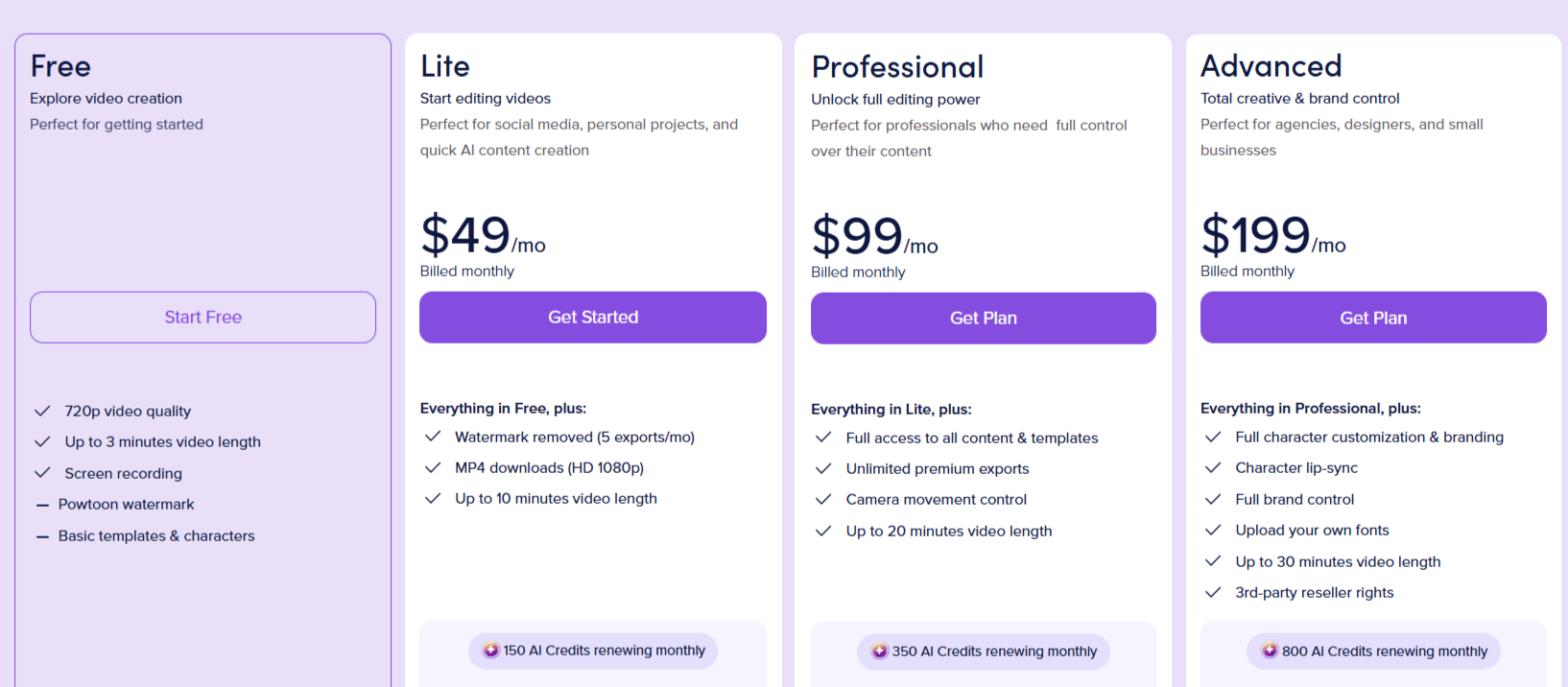
Powtoon AI offers several plans that include different tiers of access to its AI features and editing tools. They distinguish between monthly and yearly billing cycles, with significant savings offered for annual commitments.
Free Plan: Ideal for testing the waters. Includes basic templates, 3 minutes of video length, and 720p quality with a watermark.
Lite Plan: Starts at $49/month. Removes the watermark, includes 1080p HD downloads, and provides 300 annual AI credits.
Professional Plan: Priced at $99/month. Offers unlimited premium exports, camera movement control, and 500 annual AI credits.
Advanced Plan: Priced at $199/month. Includes full brand control, character customization, and 1200 annual AI credits for heavy users.
Education Plan: Available for $8/month, tailored specifically for students and teachers with specific EDU assets and branding.
Who Uses PowToon AI
Powtoon AI is available for different professionals who need to communicate information visually and quickly.
Marketing Teams: Use the tool to create quick product demos and social media clips without needing a dedicated design department.
Educators: Build interactive lecture presentations or lesson explainers that help keep students engaged.
HR and Training Managers: Create onboarding videos and internal training materials that are easy to update and distribute.
Small Business Owners: Develop professional brand videos to explain their services or announce new product launches.
Freelance Content Creators: Produce consistent video content for clients by utilizing templates and character assets to save time.
PowToon AI Pros and Cons
It is important to weigh Powtoon AI benefits against the operational limitations reported by users.
Pros
User-Friendly Interface: The drag-and-drop design makes it accessible for non-professionals to create decent animations.
Extensive Template Library: Having hundreds of pre-made templates saves hours of work on design and layout.
Unified AI Integration: The inclusion of AI for scripts, voices, and avatars provides a one-stop shop for video production.
Flexible Pricing: With free and education tiers, it is accessible for different budget levels.
Professional Output: When used correctly, the videos look polished and suitable for business presentations.
Support and Resources: The community and support team are often very helpful for new users.
Cons
Occasional Technical Bugs: There are occasional issues with exports, which can be frustrating for time-sensitive projects.
Performance Speed: Complex operations within the editor can sometimes feel slow or laggy on slower internet connections.
Watermark on Free Plan: To get a clean look without a brand watermark, you must upgrade to a paid subscription.
Final Verdict and Best For
Powtoon is an excellent, reliable platform for those who need to produce high-quality animated content but lack formal design or editing skills. Its integration of AI tools keeps it competitive in a fast-moving market, and it is particularly effective for teams looking to standardize their internal communications or marketing efforts.
We rate it 8/10, as it excels in ease of use but occasionally stumbles with performance under heavy project loads. It is best suited for small business owners, corporate trainers, and educators.
Those looking for complex, custom 3D character rigging or cinematic film editing should look elsewhere, but for 90% of business video needs, it performs exceptionally well.
Frequently Asked Questions (FAQs)
Find the questions people ask most about Powtoon AI below.
Is Powtoon better than Canva?
Both tools serve different purposes; Powtoon is specifically optimized for animation and video storytelling, while Canva is a more general-purpose graphic design suite that has recently added video features.
What are Powtoons used for?
Powtoons are commonly used for creating professional product demos, educational explainer videos, internal HR training, and engaging social media advertisements.
Is Powtoon AI free?
While you get a base amount of credits, the advanced AI features are generally tied to the credit system included in your subscription, meaning it is not "unlimited" for free users.
How much does Powtoon cost?
Prices range from a free tier to advanced business plans starting at $40/month or more, depending on the billing cycle and features required.

Powtoon Alternatives
View All