
Predis AI Video Generator

Predis.ai Key Features
Below are the standout features of Predis AI that define the user experience.
1. AI Video Generation
The platform utilizes advanced models like Veo, Seedance, and Kling to turn simple text prompts into high-definition video content. This feature is particularly useful for creators who need to produce professional-looking clips without filming or editing raw footage themselves.
2. AI-Powered Scriptwriting
Writing engaging hooks and captions is a persistent challenge for many marketers. The auto-generate script feature produces tailored copy for various formats, including promotional, educational, and user-generated content (UGC) style videos.
3. AI Avatars and Voiceovers
Predis.ai provides AI avatars that feature realistic lip-syncing capabilities. When combined with their diverse library of AI voiceovers available in multiple languages and accents, users can create dynamic, human-like presenters for their videos.
4. Image-to-Video Transformation
Beyond text-to-video, Predis AI video generator allows users to upload static images and convert them into realistic video sequences. This is a powerful feature for e-commerce store owners or brands looking to animate product photos or static portraits.
5. Competitor Analysis
This allows users to track what content themes are working for their competitors. Instead of manually auditing competitor Instagram feeds, the tool provides actionable data on what performs well in your niche.
6. Smart Scheduling and Calendar
Beyond creation, the tool provides a calendar interface for scheduling content across multiple platforms. This integrated approach ensures that you aren't just creating content in a silo; you are planning your entire content strategy from a single dashboard.
7. Hashtag and Caption Suggestions
Predis.ai functions as a strategic partner by suggesting hashtags that are specifically selected to improve reach and engagement. By analyzing the content of your post, the AI recommends tags that are relevant to your niche, saving time and helping your content gain visibility among the right demographics.
How Predis AI Works
To create a video on Predis AI, you need to go through the following steps:
Step 1: Input your idea or prompt. You begin by typing a short description of the video you want to create. You can also upload images to serve as the baseline for the AI generation.
Step 2: Choose your model. The platform allows you to select from top-tier AI models like Veo, Sora, or Kling, depending on the specific visual style you are looking to achieve.
Step 3: AI processing. The engine analyzes your input, creates a script, selects appropriate music, sequences the video clips, and overlays subtitles.
Step 4: Customization. Using the built-in editor, you can tweak templates, change colors, fonts, or adjust the placement of your brand logo. You can regenerate specific scenes if they don't meet your expectations.
Step 5: Export and Publish. Once you are satisfied with the result, you can download your HD video without a watermark or schedule it directly to your connected social media channels.

Predis.ai Pricing
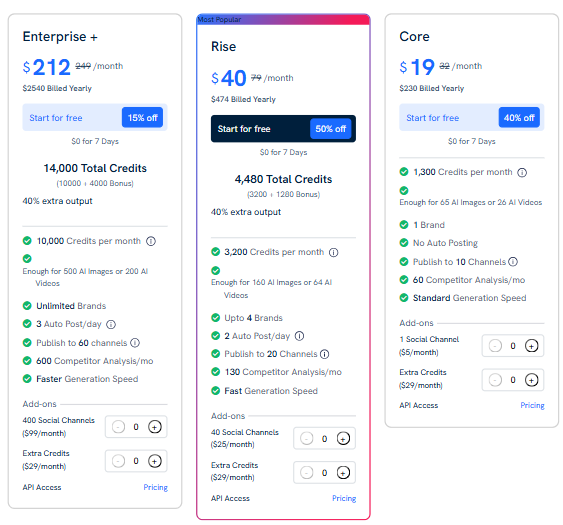
Predis.ai operates on a credit-based system. They offer a 7-day free trial, allowing users to test the features before going for a paid tier.
Core: $19/month (billed yearly). Includes 1,300 credits/month, 1 brand, and publishing to 10 channels. Standard generation speed, no auto-posting.
Rise: $40/month (billed yearly). Provides 3,200 credits/month, up to 4 brands, and publishing to 20 channels. Faster generation and 130 competitor analysis runs.
Enterprise+: $212/month (billed yearly). This plan includes 14,000 credits/month, unlimited brands, and 60 channels. Priority support and the fastest generation speed.
Use Cases
Predis AI provides the tools to help those with repetitive or high-volume content needs.
Marketing Agencies: Agencies managing multiple clients benefit from the ability to keep every brand identity separate and generate large volumes of content, while the approval workflow tools help get client sign-off without external file-sharing.
E-commerce Store Owners: For those selling products online, the tool’s ability to pull product images and information directly from a URL to create ad creatives is a major efficiency boost for scaling ad campaigns.
Solopreneurs and Influencers: Individuals who are wearing many hats find that the AI assistant acts as a "virtual social media manager," helping them maintain a consistent, professional feed while they focus on their actual business operations.
Content Creators: Creators who struggle with "content fatigue" use the idea generation and meme-maker features to inject fresh, viral-ready content into their feeds without the typical brainstorming sessions.
Small Business Owners: Business owners who lack a background in design find the ready-made templates and AI-powered layout engine helpful in creating ads that look professional without needing expensive design software.
Predis AI Pros and Cons
Based on community feedback and website data, here is a breakdown of the user experience.
Pros
Significant Time Savings: The tool handles the heavy lifting of scriptwriting and hashtag research, saving hours of manual labor each week.
Pre-Publication Insights: Unlike traditional schedulers, it provides suggestions to improve your post's performance before it goes live, acting as an early-warning system for engagement.
User-Friendly Editor: The built-in video editor is intuitive and allows for quick customizations, making it easy to keep content on-brand.
Diverse AI Model Access: Access to multiple industry-leading models, such as Seedance and Veo, under one roof gives users a distinct advantage in visual quality.
Faceless Video Capabilities: The combination of AI avatars and natural-sounding voiceovers makes it simple to produce video content without ever appearing on camera.
Effective Competitor Analysis: The ability to see what themes work for rivals removes the guesswork from content planning, as highlighted by positive feedback from early adopters.
Cons
Learning Curve: While the interface is clean, getting the most out of complex prompts to achieve perfect video output can take some trial and error.
Platform Limitations: Predis AI video generator is more heavily optimized for Instagram, which might feel restrictive if your strategy is multi-platform heavy.
Consistency Challenges: Highly complex prompts sometimes result in visual artifacts, requiring the user to regenerate a few times to achieve the desired result.
Predis.ai Alternatives
When exploring the market for social media automation, it is important to understand that no tool covers every single use case. If you find that Predis.ai doesn't quite fit your niche, there are other specialized options.
Klap AI
Klap AI excels at repurposing long-form content into shorter, punchy clips. If your workflow involves recording long podcasts or videos and you need to slice them for social media, this is a strong alternative.
Vsub
If your primary focus is on adding captions to videos, Vsub offers specialized tools for that purpose. It is a more narrow solution compared to the all-in-one approach of Predis.ai, making it a great choice if you already have your video content but need help with high-quality, auto-synced subtitles.
Super Meme
When you need to inject humor into your feed, Super Meme is a dedicated platform for generating viral memes. It is less about general content management and more about specific, high-engagement creative assets, which might be a better supplement if your strategy relies heavily on internet culture.
Auto Caption AI
For creators prioritizing accessibility and retention, Auto Caption AI provides specific features for video captioning. It is useful for those who want a focused, single-purpose tool rather than an entire suite.
Faceless.video
This tool is designed specifically for users who want to create video content without being on camera. It is a great competitor for those focused exclusively on the "faceless channel" model rather than full-scale social media management.
BigMotion AI
BigMotion AI is another specialized generator for high-motion video content. It is a good choice if your primary goal is to produce eye-catching, animated visuals rather than general post scheduling.
VideoExpress AI
As a specialized video generator, VideoExpress AI is great for users who need to push out high volumes of AI videos at a one-time price. It competes with Predis.ai's video capabilities but offers a different, more focused interface for quick video production.
Revid AI
Revid AI offers alternative approaches to social media video creation. You might choose it if you prefer its specific editing workflows or if you are looking for different templates that better suit your aesthetic.
Final Verdict and Best For
Predis.ai is a solid, efficient, and well-rounded tool for anyone looking to scale their social media presence without doubling their workload. It earns a 9/10 for its ambitious integration of generation, editing, and scheduling. It is highly recommended for agency owners and e-commerce managers who deal with large volumes of content daily.
For those who only need to post once a week or have very niche, highly bespoke creative needs, it might be more tool than you require, but for anyone looking to "level up" their output, it is a practical and proven choice.
Frequently Asked Questions (FAQs)
Here are some of the questions people ask about Predis AI.
Is Predis.ai free to use?
Predis.ai offers a free trial that allows you to experience the platform features, but it is not a permanently free service. After your trial ends, you will need to subscribe to one of their paid plans to continue accessing features like AI generation and scheduling.
Is Predis AI worth it?
For marketers or business owners who need to maintain a high volume of consistent, professional-looking content, the tool is often considered worth the investment. By calculating the time saved on manual design and copywriting, most users find the subscription pays for itself in efficiency gains.
How to use Predis AI for free?
You can access the platform for free by signing up for their 7-day trial. This gives you full access to the AI generation and scheduling tools so you can evaluate the quality of output before deciding on a paid subscription plan.
Is Predis AI any good?
Predis.ai is widely regarded as a high-utility tool, especially for agencies and small businesses. With a 4.7/5 rating on major review sites, users consistently praise it for its ease of use and its ability to solve the "blank page" problem, making it a reliable choice for social media automation.
What is predis AI used for?
It is primarily used for automating the social media workflow, from initial content ideation and competitor research to the design of static and video creatives, caption writing, hashtag generation, and the final scheduling of posts to platforms like Instagram, TikTok, and Facebook.
Is the tool available to use on my smartphone?
Yes, Predis.ai is fully accessible via a web app, and they also offer dedicated applications on both the Apple App Store and the Google Play Store for on-the-go management.
What happens after the Free Trial ends?
Once your free trial period expires, your account will move to a paid plan. You will need to choose the subscription tier that best fits your needs to maintain access to the AI generation tools.
Can I edit the videos generated by AI?
Absolutely. The Predis.ai includes a built-in video editor that allows you to customize templates, adjust fonts, change colors, insert logos, and perform quick edits on your generated output.
Can I create videos with voiceovers?
Yes, you can generate videos using AI voiceovers. The tool provides several options for voice gender, tone, language, and regional accents to suit your brand’s personality.
Can I make videos in multiple aspect ratios?
Yes, the Predis AI supports multiple aspect ratios, ensuring that your content is perfectly optimized for different platforms like Instagram Reels, TikTok, or YouTube Shorts.

Predis AI Video Generator Alternatives
View All