VideoExpress AI

Introducing VideoExpress 3.0
VideoExpress 3.0 is the latest major update to the VideoExpress software, and it is provided as a free upgrade for all existing users. Built on a philosophy of providing professional tools for a one-time payment, this version avoids the subscription models and "priority processing" fees common in the industry. The update focuses on 1080p HD quality, advanced character consistency, and granular control over AI physics and motion.
What Can You Create with VideoExpress 3.0?
VideoExpress 3.0 expands the creative possibilities for high-end video production, including:
Consistent Character Films: Maintain the same actor's face across multiple different scenes and environments.
Multi-Character Lip-Sync: Create scenes where two different characters converse with perfectly synced mouth movements.
Cinematic Short Films: Produce big-budget style clips with professional camera work like zooms, pans, and cinematic rotations.
Claymation and Anime Styles: Generate viral-style content in various artistic formats like claymation, 2D anime, and 3D 3-point lighting.
Advanced Action Sequences: Create complex motion like skydiving, driving, or fire-breathing dinosaurs.
Professional Documentaries: Use the Narration Video feature for high-quality background storytelling.
Social Media Content: Optimized for vertical (9:16) Reels and TikToks or landscape (16:9) YouTube videos.
Key VideoExpress 3.0 Features
Version 3.0 introduces several advanced features that provide more control than previous versions.
Consistent Character Image-to-Video: You can upload a portrait reference photo and use AI to generate the same character in various settings, such as sitting on a sofa or driving a car, while maintaining facial details.
Lip-Sync HD and Multilingual Support: The new Lip-Sync HD algorithm provides granular control over character speech, supporting multiple actors in a single scene. It has also been tested to work with multiple languages, allowing for global content creation.
Advanced Timestamp-Based Prompting: This feature allows you to dictate specific actions at exact times (e.g., "from 0 to 3 seconds do this, from 5 to 8 seconds do that"), giving you professional-level control over the video's timeline.
Narration Style Video and Clone Voice Integration: Instead of direct lip-sync, you can create narrative-style videos where a voiceover plays over cinematic shots. This feature integrates with Clone Voice, allowing you to use custom-cloned voices or a public library of unique voices for your stories.
Smart Edit and Stylization: The Smart Edit tool allows you to remove or replace elements within an image (like changing a candle to an ancient lamp) before animating it. You can also instantly stylize realistic photos into 3D cartoons or other artistic styles.
Other VideoExpress Useful Tools
Fix Video (Quality and Physics): A new tool that allows you to right-click a generated clip to fix physics issues (e.g., characters moving backward) or upscale the quality.
Automatic Prompt Enhancer: An AI system that auto-enhances simple prompts to make them more compatible with high-end video generation.
Parallel Generation: For All Access users, the system allows for generating multiple videos simultaneously, so you don't have to wait for one clip to finish before starting the next.
Reuse Image: Easily take a generated image that you like and re-run it through the system to change the aspect ratio or add new motions.
VideoExpress 3.0 User Experience
Professional Timeline Editor: A built-in editor allows you to drag-and-drop clips, trim "dead air" where characters are just staring, add transitions, and merge sequences into a full movie.
Public Gallery: Every video you create can be shared in a public gallery to inspire other creators.
Project IDs for Support: Every generation has a unique ID, which is used by the human support team (not AI bots) to troubleshoot specific issues.
Updated Tutorials: A dedicated page features quick demos and in-depth training on the new prompting structures.
How to Get Started with VideoExpress 3.0
To begin creating professional-grade AI videos, follow these steps:
Visit the Official Website: Go to VideoExpress.ai to access the official portal.
Log in to Your Dashboard: Use the VideoExpress.ai login link provided on their homepage to enter your secure user area.
Select Your Plan: Choose between the Basic or All-Access plans. Both plans offer a 30-day money-back guarantee, providing a risk-free way to test the software's capabilities.
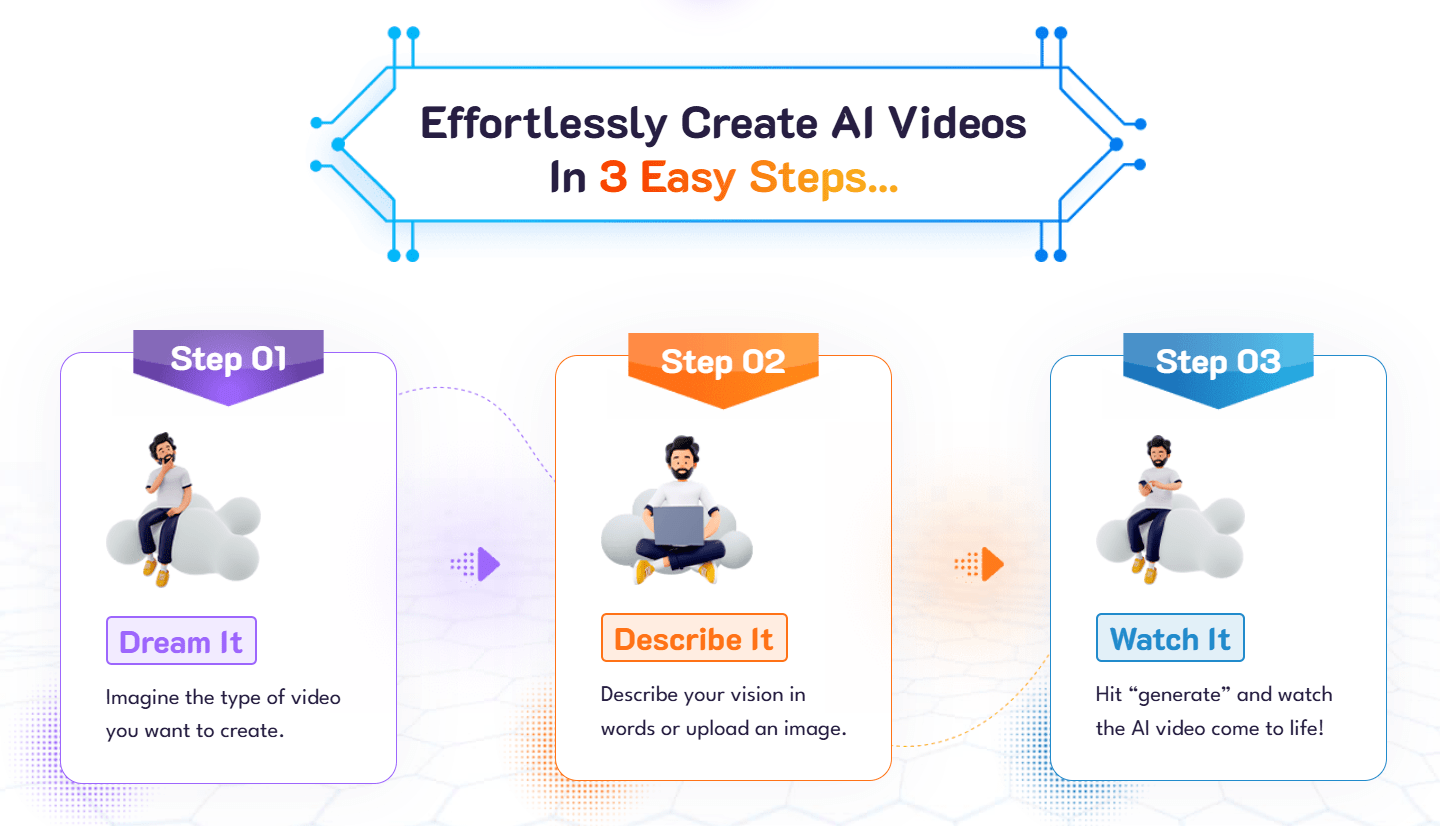
Start Generating: Once logged in, you can immediately begin using the text-to-video, image-to-video, and timeline editing tools.
Who Uses VideoExpress Software
Marketing and Advertising: Brands and businesses use VideoExpress to create promotional and informational videos for their business on platforms like Instagram, TikTok, and Facebook.
Training and Education: Educators create and sell online courses with illustrative educational videos using the Video Express AI software.
Content Creators: Content creators create animated videos for various purposes, including marketing, training, and social media with Videoexpress.ai.
Stock Footage: People generate high-quality video clips for stock footage platforms with the VideoExpress AI App.
Talking Photos: With the Talking Photos feature, users make their photos speak, sing, and express emotions with realistic lip-syncing.
Animate Images with Motion Brush: Brands use VideoExpress to highlight specific areas of their product image and bring it to life with multi-directional movement. This tool allows users to make water ripple, fire dance, and add captivating motion to videos.
Swap Faces in Videos: Users insert their faces or a client's face into their AI-generated videos to become part of the story and create personalized narratives.
Record Screen, Webcam, and Voice: Creators incorporate personal touches by using the screen, webcam, and voice recording features to capture their screen, add their own face, or seamlessly include voice recordings.
VideoExpress AI Pricing
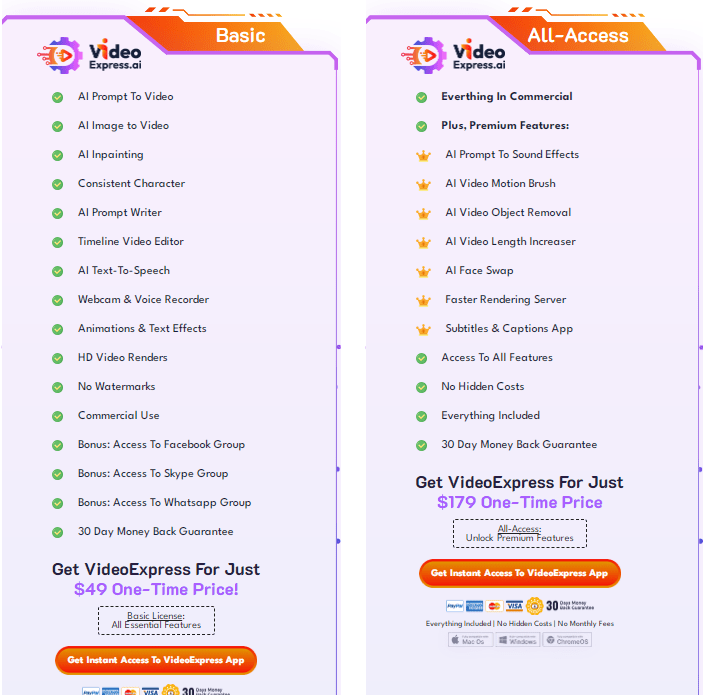
VideoExpress AI offers two pricing plans for creators and businesses. You can view the complete pricing details here. Below is a quick summary of each plan.
1. Basic
Price: $49
Pricing Model: One-time
Essential Features: AI prompt to video, AI image to video, AI inpainting, and more.
2. All-Access
Price: $179
Pricing Model: One-time.
Essential Features: Includes all the features of the Basic plan plus premium features like Talking & Singing Photos, AI Prompt To Sound Effects, AI Video Motion Brush, and more.
Video Express AI Pricing Comparison
Feature | Basic Plan ($49) | All-Access Plan ($179) |
Payment Model | One-time | One-time |
AI Video Clips per Month | 3,000 | 6,000 |
Advanced Tools | Essential features | Premium features, including Talking Photos and Motion Brush |
Support | Standard support | Standard support |
Important VideoExpress Pricing Considerations
Both plans have a fair usage limit for the number of AI-generated video clips that can be produced each month. The Basic plan allows for 3000 videos per month, while the All-Access plan allows for 6000 videos per month. However, only fully rendered AI videos will be counted towards the fair usage policy.
You have unlimited previews and can create unlimited videos up to five minutes long using the built-in video editor.
The Talking Photos feature is only available with the All-Access Plan and allows for 100 video renders (up to 30 seconds each) per month.
Both plans include a 30-day money-back guarantee.
Neither plan requires monthly fees.
Pros
All-in-One AI Video Creation Suite: The platform includes features like AI Prompt to Video, AI Image to Video, Talking Photos, and more, saving you from needing multiple apps.
Multilingual Capabilities: VideoExpress.ai supports multilingual subtitles, making it easier to reach diverse audiences globally.
One-Time Pricing Model: Unlike many competitors that charge monthly fees, the VideoExpress AI tool offers a one-time payment structure, making it cost-effective for long-term use.
Ownership Rights: You retain full ownership of the videos you create, allowing you to sell them without additional costs.
Money-back guarantee: Video Express AI offers a 30-day money-back guarantee, providing you with a risk-free opportunity to try the software.
Includes Training Materials: VideoExpress AI provides step-by-step
video training, walking you through the entire process.Access to Community Groups: You get access to Facebook, Skype, and
WhatsApp groups are included as bonuses for both plans.
Cons
No Free Trial or Free Plan: VideoExpress does not offer a free trial or free plan, which may deter you from testing the platform before buying the software.
Learning Curve for Advanced Features: While basic video creation is straightforward, utilizing advanced features like AI inpainting and motion brush may require some time to learn effectively.
Potential Over-Reliance on AI: You might become overly dependent on AI-generated content, which could limit your creativity and originality in video production over time.
Frequently Asked Questions
Here are the answers to some questions about VideoExpress.ai you might want to check.
Where can I find the VideoExpress.ai login page?
You can access the login page directly at the official website. Always ensure you are on the official domain to protect your account credentials.
Is there a VideoExpress AI app for PC?
VideoExpress is a cloud-based AI platform. You do not need to download an app or install software on your PC. Simply log in through your web browser to start creating videos.
What is the price of VideoExpress AI?
VideoExpress offers a transparent, one-time payment model. The Basic plan is $49, and the All-Access plan is $179. There are no recurring monthly fees, making it a cost-effective solution for long-term content creation.
Can I use VideoExpress AI for free?
There is no free version of the software. However, the platform includes a 30-day money-back guarantee, which allows you to buy the software and test its features with the security of a full refund if it does not meet your needs.
Is Video Express AI Legit?
Yes, Video Express AI is legitimate. It has a fair trust score and positive user feedback, indicating it’s a reliable tool for creating videos from text and images. However, it's always wise to conduct your own research before making a purchase.
Is Video Express AI Worth It?
VideoExpress.ai is worth it, especially if you want quick video creation without ongoing fees. With its cost-effective one-time payment model, you gain access to powerful features for video creation, including text-to-video and image-to-video generation, AI inpainting, text-to-speech, AI face swap, and more.
How to Use Video Express AI?
Using Video Express AI is straightforward: enter text or upload images to generate videos. You can customize elements such as music, voiceovers, and animations, enabling personalized video generation. The platform also provides prompts to inspire your creativity if you don’t know where to start.
Is There a Free Trial or Free Download?
A common question among new users is whether there is a VideoExpress AI free download or a free trial version. Currently, VideoExpress operates on a one-time payment model rather than a subscription or free-tier model. This means there is no "free" version or "cracked" software available.
We strongly advise against searching for "VideoExpress AI mod APK" or "crack" files, as these are often security risks that can compromise your computer. When you buy the official software, you gain access to the secure, cloud-based dashboard, full support, and the latest AI rendering updates.
Can I use Video Express AI for commercial projects?
Yes. You retain full ownership of the videos you create. This allows you to use them for marketing, client work, or social media monetization without paying additional licensing fees.
Does Video Express AI support multiple languages?
Yes, the platform includes multilingual support for subtitles and voiceovers, making it an excellent choice for creators looking to reach a global audience.
How does the one-time payment model work?
Video Express AI requires only a single payment rather than a monthly subscription fee. This provides a cost-effective way to maintain your video production workflow without recurring expenses.

"The AI Video Generator is Affordable"
Terpase Paul
7 months ago
I kind of love Videoexpress AI. It generates cool videos. Though some videos are kind of catoony.
"Retired"
Gene
1 year ago
I requested a refund the day I paid $179. It's been 5 days and no refund. 30 day money back guarantee you advertised. I can’t use any videos this creates. I get nothing but slow motion videos with lots of deformities and morphing constantly. Refund please! This is not working for me.
VideoExpress AI Alternatives
View All