Nova AI

Nova AI Features
Nova AI offers a suite of tools that focus on both organization and production. Below are the key features that make this platform a useful addition to a video creator's toolkit.
Intelligent Video Search
This is the flagship feature. When you upload your media, the platform analyzes the content and identifies people, objects, emotions, and scene types. You can then search for specific combinations, such as "person running" or "happy scene with a car," allowing you to locate footage in seconds rather than spending hours watching raw files.
Auto-Subtitle Generation
Accessibility is vital, and Nova AI makes it easy to add text to your videos. It automatically transcribes speech and generates subtitles that you can hardcode into the video or download as SRT, VTT, or TXT files.
Video Translation
Expanding your reach globally is much easier with the integrated translation tool. You can translate your video subtitles into 75 different languages with just a few clicks. This is particularly beneficial for online courses, documentaries, and international marketing campaigns that need to reach a worldwide audience.
Text-to-Speech Engine
If your video requires a voiceover but you do not have recording equipment, the built-in text-to-speech generator is a handy option. It offers several male and female voices, allowing you to turn scripts into audio tracks directly within the editor.
Automatic Clip Generation
For social media managers, creating short-form content from long-form videos is a daily chore. The AI can automatically suggest and generate short clips based on your preferences, such as scene duration and content type. This feature helps repurpose long videos for platforms like TikTok or Instagram without starting from scratch.
Stock Asset Library
Nova AI partners with iStock by Getty Images to provide users with access to professional-quality stock footage and audio. You can find these assets directly within the interface, which streamlines the process of filling gaps in your narrative without browsing external websites.
Video Resizing and Merging
Whether you are adapting a video for vertical mobile screens or combining multiple clips for a compilation, the platform provides simple tools for these tasks. It helps standardize your content for different social media players, ensuring your video looks correct regardless of where it is posted.
How Nova AI Works
Getting started with Nova AI is straightforward because it is entirely web-based, meaning there is no need to download anything. Follow these steps to begin using the platform.
Step 1: Create an account on the official website and upload your video files to the dashboard.
Step 2: Allow the system to process the footage; the AI will automatically scan and tag every scene based on people, actions, and objects.
Step 3: Use the search bar to enter descriptive terms to find the exact clips you need from your uploaded archive.
Step 4: Use the built-in editor to trim, merge, or add subtitles to your chosen clips.
Step 5: If needed, use the translation or text-to-speech tools to enhance your project.
Step 6: Export your final video directly to your computer or share it to your preferred social channel.
Nova AI Pricing and Subscription Plans
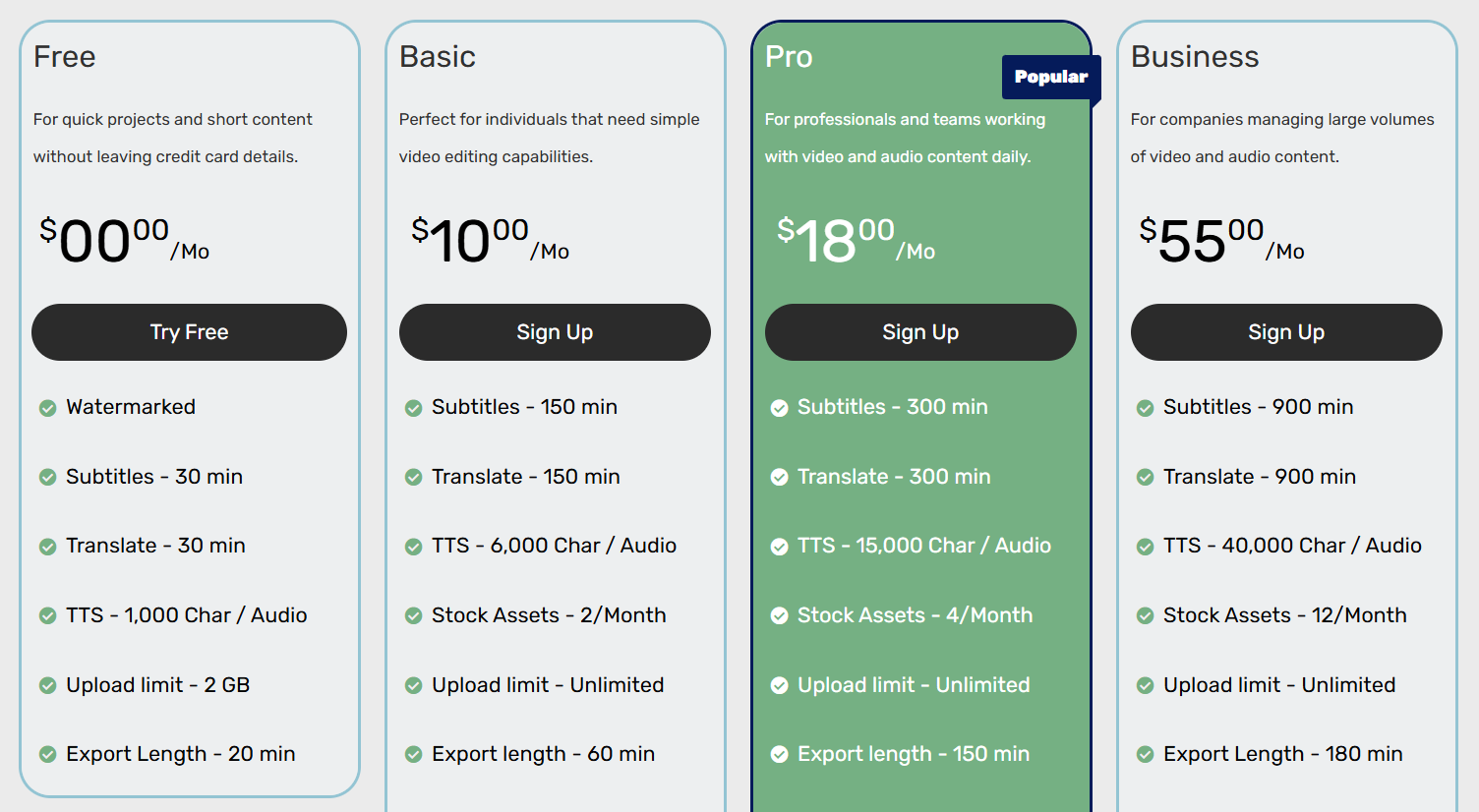
Nova AI offers various tiers to suit different needs, from casual creators to large production teams. Below is an overview of the plans available.
Plan/Tier | Pricing | Features |
Free | $0/Month | 2GB Upload, 30 min subtitles, 10 min export |
Basic | $10/Month | 100GB Storage, 150 min subtitles, 60 min export |
Pro | $18/Month | 500GB Storage, 300 min subtitles, 150 min export |
Business | $55/Month | 2TB Storage, 900 min subtitles, 180 min export |
Who Uses Nova AI
This tool is ideal for anyone handling high volumes of video who needs to maintain efficiency. Here are the primary user groups.
Content Creators: YouTubers and influencers who need to organize vast libraries of old footage and quickly find clips for new edits.
Marketing Teams: Agencies that manage multiple client accounts and need a fast way to repurpose long-form meetings or event videos into short social clips.
Educators: Teachers and online course creators who need to transcribe long lectures and translate them into multiple languages for students.
SaaS Companies: Businesses that produce regular product demo videos and need to keep their assets searchable for different team members.
Production Studios: Professional teams that handle large archives and want to reduce the time editors spend on manual logging.
Nova AI Pros and Cons
While the platform offers significant efficiency, it is important to weigh its strengths and limitations.
Pros
Time-Saving Search: The AI tagging system eliminates the need for manual scrubbing through hours of footage.
Ease of Use: Being a web-based platform, it is accessible from any browser without requiring the installation of heavy software.
Integrated Translation: The ability to translate subtitles into 75 languages makes it highly versatile for international content.
Social Media Ready: Tools for resizing and clip generation are perfectly tailored for creators focused on TikTok and Instagram.
Responsive Support: Users have noted that the team is helpful and responsive to feature requests.
Asset Integration: Access to stock footage within the same tab keeps the creative workflow uninterrupted.
Cons
Processing Time: Large operations can take a while to finish, which is common with cloud-based AI tools.
Free Plan Limits: The free tier includes a watermark and restrictive upload limits, making it strictly a trial version.
Learning Curve: While simple, new users may need time to understand the tagging system to get the best search results.
Not an Offline Tool: You must have a consistent internet connection to use the service, as it is not a traditional software package.
Final Verdict and Best For
Nova AI is a practical solution for creators who are drowning in raw footage and need a way to make sense of their media library without manual effort. The search engine is the standout feature, saving hours of work that would otherwise be spent scrubbing through timeline files.
While it may have some minor processing delays, the time saved during the pre-editing phase is well worth it for any serious content producer.
We give it an 8.5/10, as it performs its primary mission of organizing media extremely well, even if it is not meant for complex, high-end cinema grading. It is best suited for social media teams and YouTubers who need speed and organization.

Nova AI Alternatives
View All